# Payments
The transaction is carried out asynchronously. As a result of the request, you will receive payment id synchronously, and callback-notification will be sent asynchronously.
Use the userWebLink received in the synchronous response to work with payment page, and jsOperationId to work through [Mandarin Custom Pay](./user_interface.md#mandarin-custom- pay).
TESTING
Data for testing is available in the Payment services section.
# Authentication
All payment acceptance API requests are authenticated with the x-auth header. See how to build the value in Request authentication.
# Payment page
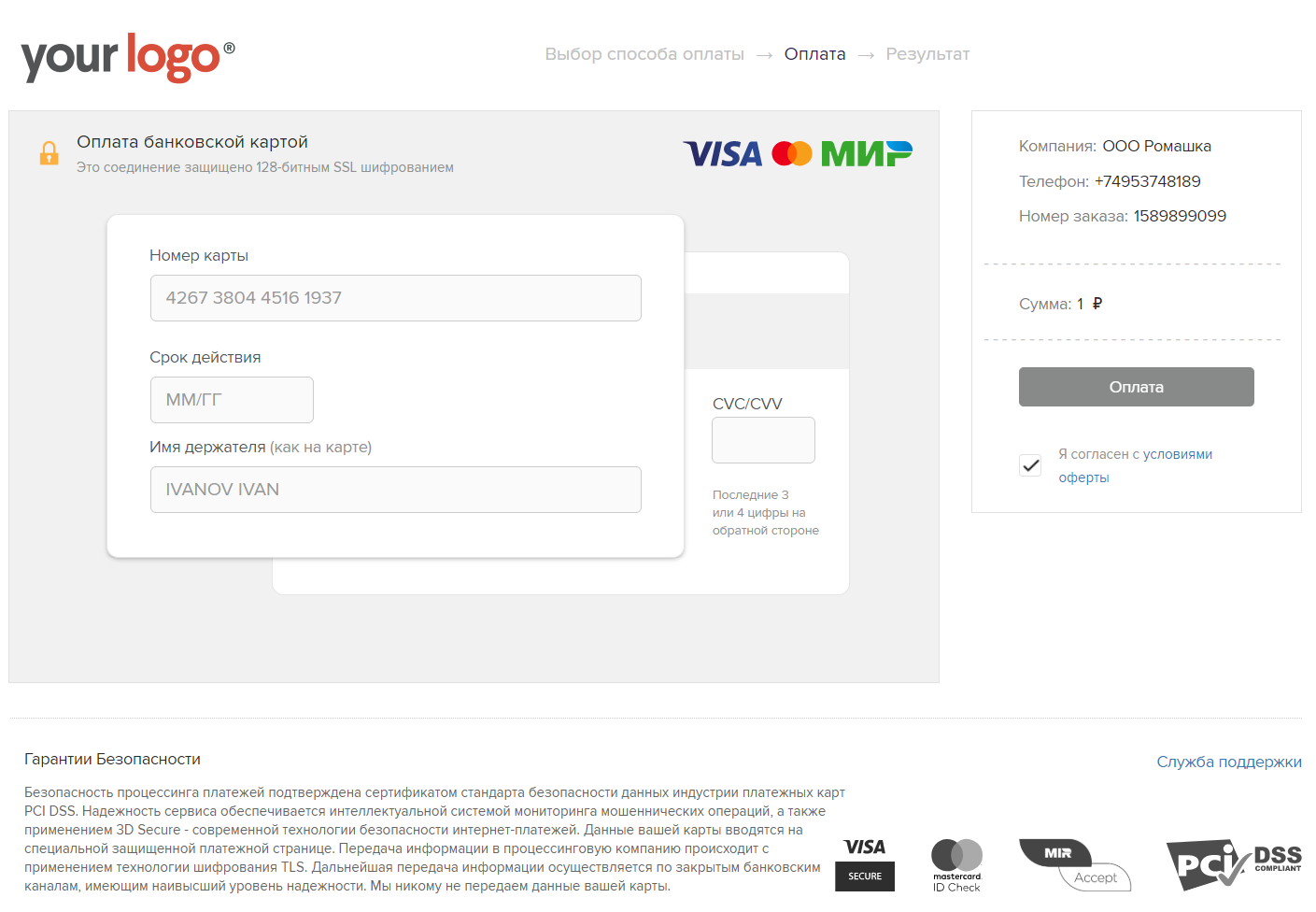
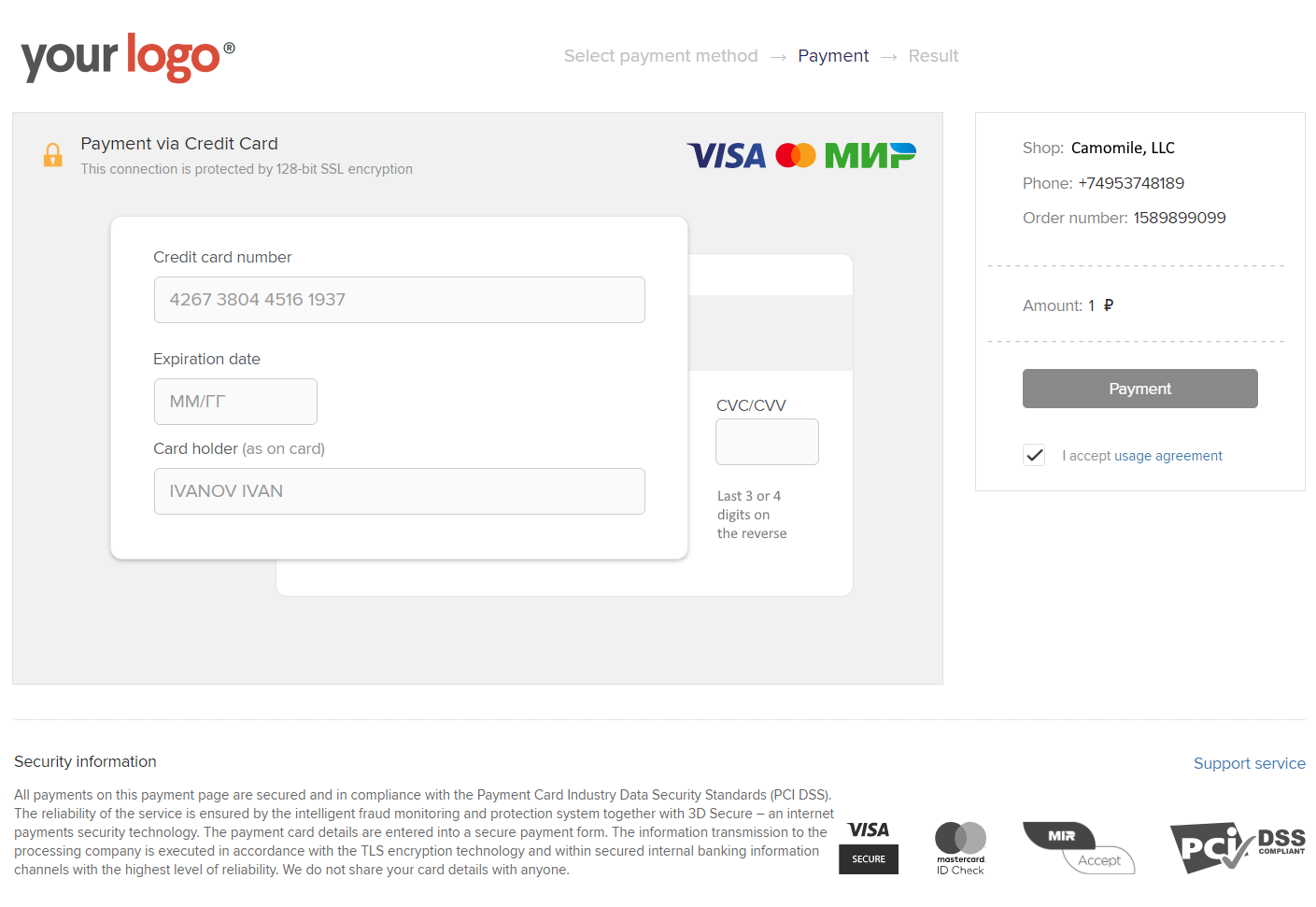
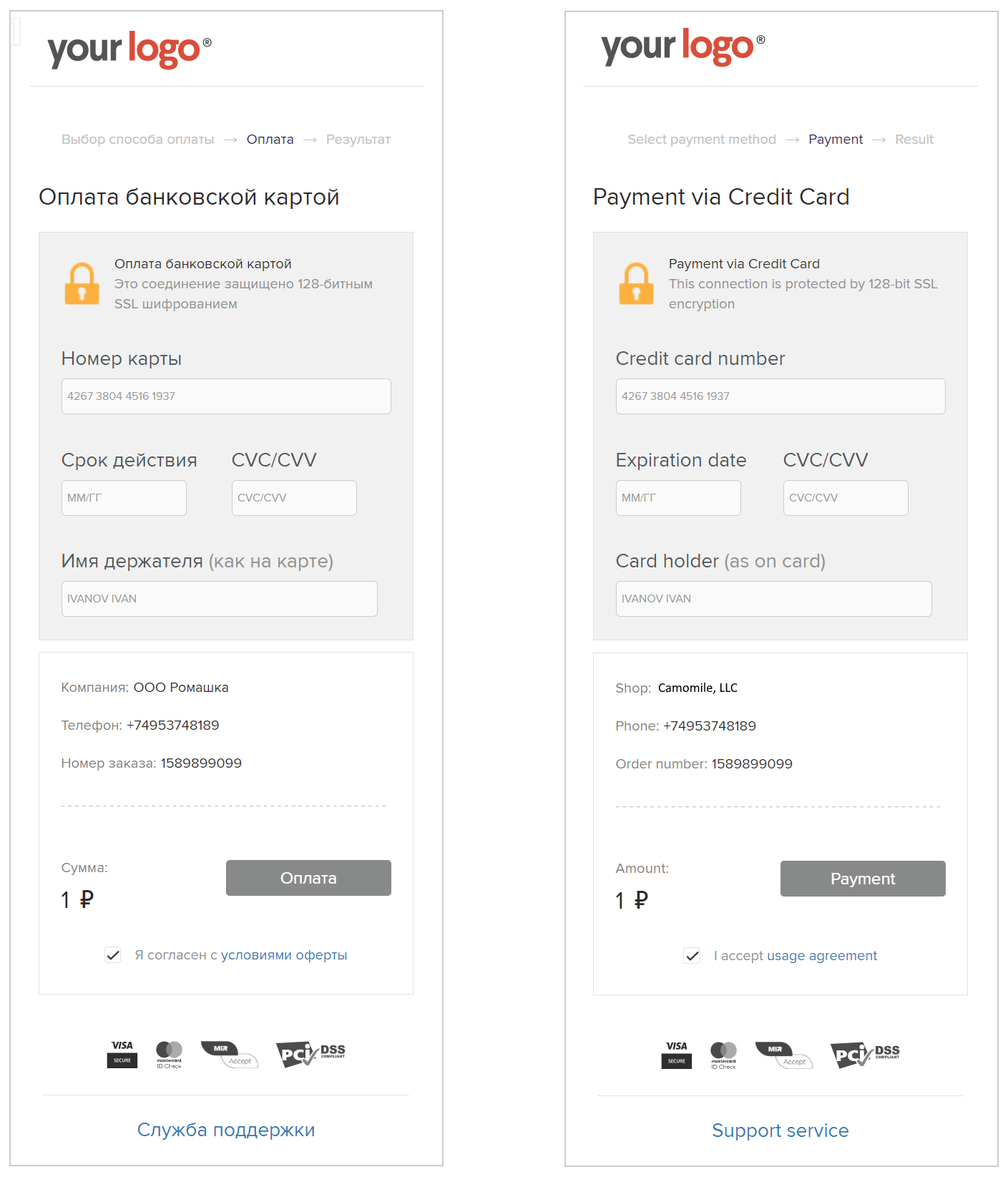
The Mandarin payment page has a responsive design and shows payment information that you passed in the API request.
To use the payment page, redirect the user to the URL from the userWebLink parameter received in the synchronous response to your API request.
The payment page is localized in Russian and English. The language is selected automatically based on the user's browser settings.
Payment page in Russian
Payment page in English
Mobile layout of the payment page
# One-step payment
To debit funds from a card as part of a one-step payment scheme, you must create a transaction with "action": "pay" by sending a POST request to https://secure.mandarinpay.com/api/transactions
| Parameter | Required | Parameter | Required | |
|---|---|---|---|---|
| payment | Yes | customValues[] | No | |
| payment.action | Yes | customValues[].name | No | |
| payment.orderId | Yes | customValues[].value | No | |
| payment.price | Yes | metadata | No | |
| payment.orderActualTill | No | urls | No | |
| customerInfo | Yes | urls.return | No | |
| customerInfo.email | Yes | urls.callback | No | |
| customerInfo.phone | No* | |||
| allowinteractive | No | |||
| interactive | No |
PLEASE ATTENTION!
*For MCC 4814 and MCC 6050 the customerInfo.phone parameter is required. You can clarify the MCC for your bank terminals with your manager or by contacting technical support (opens new window).
Synchronous response and asynchronous callback-notification can contain a wider set of parameters compared to the example.
Request
POST https://secure.mandarinpay.com/api/transactions
{
	"payment": {
		"action": "pay",
		"orderId": "your_unique_order_id",
		"price": "1000.00",
		"orderActualTill": "2020-02-20 12:34:56+00:00"
	},
	"customerInfo": {
		"email": "user@example.com",
		"phone": "+79001234567"
	},
	"customValues": [
		{"name": "first parameter to save and show", "value": "p1"},
		{"name": "second parameter to save and show", "value": "p2"}
	],
	"metadata": {
		"first_parameter_to_callback_and_not_to_show": "p1",
		"second_parameter_to_callback_and_not_to_show": "p2"
	},
	"urls": {
		"callback": "http://...",
		"return": "http://..."
	}
}
Response in case of successful transaction creation (200 OK)
{
	"id": "43913ddc000c4d3990fddbd3980c1725",
	"userWebLink": "https://secure.mandarinpay.com/Pay?transaction=0eb51e74-e704-4c36-b5cb-8f0227621518",
	"jsOperationId": "9874694yr87y73e7ey39ed80"
}
Response if the transaction is not created (400 Bad request)
{
	"error": "Invalid request"
}
# Two-stage payment
Two-stage payment means that funds are reserved on the card in the first request (holding), and then a debit (pay) or unblock (reversal) is performed.
If there is no confirmation debit, the amount is automatically unblocked after a certain time (from 7 to 30 days).
It is also possible to force-unblock the ENTIRE blocked amount (reversal).
Two holding operation types are available:
- Authorization —
"action": "auth"; - Preauthorization —
"action": "preauth".
# Differences between holding types
| Operation type | action value | When to use | Features |
|---|---|---|---|
| Authorization | auth | When the final amount is known in advance and in most cases is debited in full within a short period (up to 7 days) | Hold lasts up to 7 days. For a partial debit, first perform a partial reversal for the difference, then pay |
| Preauthorization | preauth | When the final amount may be less than the held amount and partial debits are needed without a separate unblock step | Full or partial debit is allowed; on a partial debit the remaining amount is unblocked automatically |
# Authorization
To authorize funds on a card as part of a two-stage payment scheme, create a transaction with "action": "auth".
The transaction is carried out asynchronously. As a result of the request, you will receive payment id synchronously, and a callback notification will be sent asynchronously.
Use the userWebLink from the synchronous response to work with the payment page, and jsOperationId to work through Mandarin Custom Pay.
IMPORTANT
Authorization (auth) characteristics:
- hold period — up to 7 days;
- recommended if more than 50% of holding operations end with a full-amount debit;
- if a partial debit is required, first perform a partial unblock (
reversal) for the difference, then performpayfor the debit amount.
After a successful authorization callback notification is received, the transaction id from it can be used for a full debit ("action": "pay") or unblock ("action": "reversal") via REST API as target.transaction.
| Parameter | Required | Parameter | Required | |
|---|---|---|---|---|
| payment | Yes | customValues[] | No | |
| payment.action | Yes | customValues[].name | No | |
| payment.orderId | Yes | customValues[].value | No | |
| payment.price | Yes | metadata | No | |
| payment.orderActualTill | No | urls | No | |
| customerInfo | Yes | urls.return | No | |
| customerInfo.email | Yes | urls.callback | No | |
| customerInfo.phone | No |
Synchronous response and asynchronous callback notification can contain a wider set of parameters compared to the example.
Request
curl --request POST \
  --url https://secure.mandarinpay.com/api/transactions \
--header 'Content-Type: application/json' \
--header 'x-auth: {{x_auth}}' \
--data-raw '{
	"payment": {
		"action": "auth",
		"orderId": "your_unique_order_id",
		"price": "1000.00",
		"orderActualTill": "2020-02-20 12:34:56+00:00"
	},
	"customerInfo": {
		"email": "user@example.com",
		"phone": "+79001234567"
	},
	"customValues": [
		{"name": "first parameter to save and show", "value": "p1"},
		{"name": "second parameter to save and show", "value": "p2"}
	],
	"metadata": {
		"first_parameter_to_callback_and_not_to_show": "p1",
		"second_parameter_to_callback_and_not_to_show": "p2"
	},
	"urls": {
		"callback": "http://...",
		"return": "http://..."
	}
}'
Response in case of successful transaction creation (200 OK)
{
	"id": "43913ddc000c4d3990fddbd3980c1725",
	"userWebLink": "https://secure.mandarinpay.com/Pay?transaction=0eb51e74-e704-4c36-b5cb-8f0227621518",
	"jsOperationId": "9874694yr87y73e7ey39ed80"
}
Response if the transaction is not created (400 Bad request)
{
	"error": "Invalid request"
}
# Preauthorization
To preauthorize funds on a card as part of a two-stage payment scheme, create a transaction with "action": "preauth".
After a successful preauthorization callback notification is received, the transaction id from it can be used for a full or partial debit ("action": "pay") or unblock ("action": "reversal") via REST API as target.transaction.
| Parameter | Required | Parameter | Required | |
|---|---|---|---|---|
| payment | Yes | customValues[] | No | |
| payment.action | Yes | customValues[].name | No | |
| payment.orderId | Yes | customValues[].value | No | |
| payment.price | Yes | metadata | No | |
| payment.orderActualTill | No | urls | No | |
| customerInfo | Yes | urls.return | No | |
| customerInfo.email | Yes | urls.callback | No | |
| customerInfo.phone | No |
Synchronous response and asynchronous callback notification can contain a wider set of parameters compared to the example.
Request
curl --request POST \
  --url https://secure.mandarinpay.com/api/transactions \
--header 'Content-Type: application/json' \
--header 'x-auth: {{x_auth}}' \
--data-raw '{
	"payment": {
		"action": "preauth",
		"orderId": "your_unique_order_id",
		"price": "1000.00",
		"orderActualTill": "2020-02-20 12:34:56+00:00"
	},
	"customerInfo": {
		"email": "user@example.com",
		"phone": "+79001234567"
	},
	"customValues": [
		{"name": "first parameter to save and show", "value": "p1"},
		{"name": "second parameter to save and show", "value": "p2"}
	],
	"metadata": {
		"first_parameter_to_callback_and_not_to_show": "p1",
		"second_parameter_to_callback_and_not_to_show": "p2"
	},
	"urls": {
		"callback": "http://...",
		"return": "http://..."
	}
}'
Response in case of successful transaction creation (200 OK)
{
	"id": "43913ddc000c4d3990fddbd3980c1725",
	"userWebLink": "https://secure.mandarinpay.com/Pay?transaction=0eb51e74-e704-4c36-b5cb-8f0227621518",
	"jsOperationId": "9874694yr87y73e7ey39ed80"
}
Response if the transaction is not created (400 Bad request)
{
	"error": "Invalid request"
}
# Preauthorization using a card token
You can block funds on the payer's linked card using preauthorization with a card token. It is performed without the payer's participation.
PLEASE ATTENTION!
To activate this operation type, you must discuss the technical details with your manager.
After setup is complete, you can pass target.card with the full card data token received after tokenization.
The transaction is carried out asynchronously. As a result of the request, you will receive payment id synchronously, and a callback notification will be sent asynchronously.
A situation is possible in which the full card data token is forced into the payout-only status. This happens when the payment system returns a code that makes further recurring payments impossible.
In this case, you will receive a callback with an error and a flag that further recurring payments are impossible. Additionally, you will receive a callback with a token that has the payout-only status. Further auto-debit attempts will proceed without creating a transaction; the request will return Card binding is payout-only.
| Parameter | Required | Parameter | Required | |
|---|---|---|---|---|
| payment | Yes | customValues[] | No | |
| payment.action | Yes | customValues[].name | No | |
| payment.orderId | Yes | customValues[].value | No | |
| payment.price | Yes | metadata | No | |
| payment.orderActualTill | No | urls | No | |
| customerInfo | Yes | urls.return | No | |
| customerInfo.email | Yes | urls.callback | No | |
| customerInfo.phone | No | |||
| target | Yes | |||
| target.card | Yes |
Synchronous response and asynchronous callback notification can contain a wider set of parameters compared to the example.
Request
curl --request POST \
  --url https://secure.mandarinpay.com/api/transactions \
--header 'Content-Type: application/json' \
--header 'x-auth: {{x_auth}}' \
--data-raw '{
	"payment": {
		"action": "preauth",
		"orderId": "your_unique_order_id",
		"price": "1000.00",
		"orderActualTill": "2020-02-20 12:34:56+00:00"
	},
	"customerInfo": {
		"email": "user@example.com",
		"phone": "+79001234567"
	},
	"target": {
		"card": "0eb51e74-e704-4c36-b5cb-8f0227621518"
	},
	"customValues": [
		{"name": "first parameter to save and show", "value": "p1"},
		{"name": "second parameter to save and show", "value": "p2"}
	],
	"metadata": {
		"first_parameter_to_callback_and_not_to_show": "p1",
		"second_parameter_to_callback_and_not_to_show": "p2"
	},
	"urls": {
		"callback": "http://...",
		"return": "http://..."
	}
}'
Response in case of successful transaction creation (200 OK)
{
	"id": "43913ddc000c4d3990fddbd3980c1725"
}
Response if auto-debit is impossible (200 OK)
{
	"error": "Card binding is payout-only"
}
Response if the transaction is not created (400 Bad request)
{
	"error": "Invalid request"
}
# Completion of calculations
To complete settlements, use "action": "pay" and the id from the successful holding notification as target.transaction. The payer's active participation is not required.
The price value can be any amount within the value passed in the original holding transaction.
For preauth:
- full or partial debit is allowed;
- on a partial debit, the remaining amount is unblocked automatically.
For auth:
- if a partial debit is needed, first perform a partial
reversalfor the difference, then sendpayfor the actual debit amount; - a partial transition to debit without a prior
reversalis not performed automatically.
Cancellation (reversal) for two-stage payment is performed via target.transaction.
| Parameter | Required | Parameter | Required | |
|---|---|---|---|---|
| payment | Yes | customValues[] | No | |
| payment.action | Yes | customValues[].name | No | |
| payment.orderId | Yes | customValues[].value | No | |
| payment.price | Yes | metadata | No | |
| customerInfo | Yes | urls | No | |
| customerInfo.email | Yes | urls.return | No | |
| customerInfo.phone | No | urls.callback | No | |
| target | Yes | |||
| target.transaction | Yes |
Synchronous response and asynchronous callback notification can contain a wider set of parameters compared to the example.
Request
curl --request POST \
  --url https://secure.mandarinpay.com/api/transactions \
--header 'Content-Type: application/json' \
--header 'x-auth: {{x_auth}}' \
--data-raw '{
	"payment": {
		"action": "pay",
		"orderId": "your_unique_order_id",
		"price": "900.00"
	},
	"customerInfo": {
		"email": "user@example.com",
		"phone": "+79001234567"
	},
	"target": {
		"transaction": "43913ddc000c4d3990fddbd3980c1725"
	},
	"customValues": [
		{"name": "first parameter to save and show", "value": "p1"},
		{"name": "second parameter to save and show", "value": "p2"}
	],
	"metadata": {
		"first_parameter_to_callback_and_not_to_show": "p1",
		"second_parameter_to_callback_and_not_to_show": "p2"
	},
	"urls": {
		"callback": "http://...",
		"return": "http://..."
	}
}'
Response in case of successful transaction creation (200 OK)
{
	"id": "43913ddc000c4d3990fddbd3980c1725"
}
Response if the transaction is not created (400 Bad request)
{
	"error": "Invalid request"
}
# Partial debit for auth: reversal -> pay sequence
If 1000.00 was held via auth and you need to debit 900.00:
- Perform
reversalfor100.00; - Perform
payfor900.00.
Step 1. Partial reversal
curl --request POST \
  --url https://secure.mandarinpay.com/api/transactions \
--header 'Content-Type: application/json' \
--header 'x-auth: {{x_auth}}' \
--data-raw '{
	"payment": {
		"action": "reversal",
		"orderId": "your_unique_order_id_reversal",
		"price": "100.00"
	},
	"customerInfo": {
		"email": "user@example.com",
		"phone": "+79001234567"
	},
	"target": {
		"transaction": "43913ddc000c4d3990fddbd3980c1725"
	},
	"customValues": [
		{"name": "first parameter to save and show", "value": "p1"},
		{"name": "second parameter to save and show", "value": "p2"}
	],
	"metadata": {
		"first_parameter_to_callback_and_not_to_show": "p1",
		"second_parameter_to_callback_and_not_to_show": "p2"
	},
	"urls": {
		"callback": "http://...",
		"return": "http://..."
	}
}'
Step 2. Partial pay for the remaining amount
curl --request POST \
  --url https://secure.mandarinpay.com/api/transactions \
--header 'Content-Type: application/json' \
--header 'x-auth: {{x_auth}}' \
--data-raw '{
	"payment": {
		"action": "pay",
		"orderId": "your_unique_order_id_pay",
		"price": "900.00"
	},
	"customerInfo": {
		"email": "user@example.com",
		"phone": "+79001234567"
	},
	"target": {
		"transaction": "43913ddc000c4d3990fddbd3980c1725"
	},
	"customValues": [
		{"name": "first parameter to save and show", "value": "p1"},
		{"name": "second parameter to save and show", "value": "p2"}
	],
	"metadata": {
		"first_parameter_to_callback_and_not_to_show": "p1",
		"second_parameter_to_callback_and_not_to_show": "p2"
	},
	"urls": {
		"callback": "http://...",
		"return": "http://..."
	}
}'
# Saving a card on the payment page
This feature shows the payer their previously saved bank cards at checkout. It makes repeat payments easier and can improve conversion.
When you pass the payer identifier (clientCustomerId), the system checks whether the user has previously saved cards and displays them on the payment form.
To enable the feature, pass defaultSaveCardData = true.
# Parameters
The following fields are added to the customerInfo object:
| Parameter | Type | Required | Description |
|---|---|---|---|
clientCustomerId | string | Yes | Unique payer identifier (GUID) used to look up previously saved cards. |
defaultSaveCardData | boolean | Yes | Enables displaying and saving cards. |
# Sample request
POST https://secure.mandarinpay.com/api/transactions
{
	"payment": {
		"action": "pay",
		"orderId": "12345",
		"price": "1000.00"
	},
	"customerInfo": {
		"email": "user@example.com",
		"phone": "+79999999999",
		"clientCustomerId": "550e8400-e29b-41d4-a716-446655440000",
		"defaultSaveCardData": true
	}
}
# System behavior
- If the payer has cards saved earlier on the payment page, they are shown on the form; the payer can select one and enter only the CVV/CVC to pay.
- If there are no saved cards, the standard card entry form is shown; with
defaultSaveCardDataset totrue, card details may be saved on the page after a successful payment.
# Notes
clientCustomerIdmust be unique and stable for each payer. If it changes, the user is treated as new and previously saved cards on the page are not shown.- Displaying and saving cards only work when
defaultSaveCardDataistrue.
# Payment using a saved card in interactive mode
In this case, the payer makes a payment or authorization by selecting the saved card and entering only CVV/CVC code. The next action depends on the settings of your terminal: if it allows you to make a payment without going through the 3-D Secure procedure, then no additional actions are required. Otherwise, the payer’s browser will be redirected to enter an SMS code to pass 3-D Secure.
PLEASE ATTENTION!
If a payment without using 3-D Secure receives a protest from the payer, the payment system will automatically deduct the amount of this payment from you.
In addition, a scenario is possible in which the payer selects a saved card and then goes through the 3-D Secure procedure. The payer does not enter the CVV/CVC code.
In any scenario, the process takes two steps:
Initiation.
Create a transaction.
To initiate payment/authorization, you need to transfer [full card data token](./api_tokenization.md#tokenization-full-card data) and the interactive payment indicator "interactive": true to Mandarin.
The synchronous response to the initiation request contains the payment id, and the jsOperationId for creating a transaction via Mandarin Custom Pay.
| Parameter | Required | Parameter | Required | |
|---|---|---|---|---|
| payment | Yes | customValues[] | No | |
| payment.action | Yes | customValues[].name | No | |
| payment.orderId | Yes | customValues[].value | No | |
| payment.price | Yes | metadata | No | |
| target | Yes | urls | No | |
| target.card | Yes | urls.return | No | |
| interactive | Yes | urls.callback | No |
Synchronous response and asynchronous callback-notification can contain a wider set of parameters compared to the example.
Interactive payment request
POST https://secure.mandarinpay.com/api/transactions
{
	"payment": {
		"action": "pay",
		"orderId": "your_unique_order_id",
		"price": "1000.00"
	},
	"target": {
		"card": "0eb51e74-e704-4c36-b5cb-8f0227621518"
	},
	"interactive": true,
	"customValues": [
		{"name": "first parameter to save and show", "value": "p1"},
		{"name": "second parameter to save and show", "value": "p2"}
	],
	"metadata": {
		"parameter to callback and not to show 0": "0",
		"parameter to callback and not to show 1": "1"
	},
	"urls": {
		"callback": "http://...",
		"return": "http://..."
	}
}
Response in case of successful initiation (200 OK)
{
	"id": "43913ddc000c4d3990fddbd3980c1725",
	"jsOperationId": "9874694yr87y73e7ey39ed80"
}
Response if initiation does not occur (400 Bad request)
{
	"error": "Invalid request"
}
In the second step (transaction creation), Mandarin should receive from you the jsOperationId values from the previous request and CVV (which is passed through Mandarin Custom Pay).
The entire interaction process is described in more detail on a separate page about interactive payment.
# One-click payment using a saved card without a CVV/CVC code and without 3-D Secure
The payment is made using a previously saved (linked) card without the need to re-enter the following information:
- CVV/CVC code - a three-digit security code on the back of the card
- Confirmation via 3-D Secure - two-factor authentication
Features:
- The payment is initiated directly by the payer;
- The previously saved (linked) payer card is used;
- No additional verification steps for the payer.Payment using a saved card without entering a CVV/CVC code and without going through 3-D Secure
In the request, you need to pass the token of full card data and "allowinteractive": true. Mandarin will make a regular recurring payment (auto-debit) without asking the payer for any additional information. This method provides convenience and speed of payment for the client and has fewer restrictions than recurring payment.
| Parameter | Required | Parameter | Required | |
|---|---|---|---|---|
| payment | Yes | customValues[] | No | |
| payment.action | Yes | customValues[].name | No | |
| payment.orderId | Yes | customValues[].value | No | |
| payment.price | Yes | metadata | No | |
| target | Yes | urls | No | |
| target.card | Yes | urls.return | No | |
| allowinteractive | Yes | urls.callback | No |
Synchronous response and asynchronous callback-notification can contain a wider set of parameters compared to the example.
Request allowinteractive payment
POST https://secure.mandarinpay.com/api/transactions
{
	"payment": {
		"action": "pay",
		"orderId": "your_unique_order_id",
		"price": "1000.00"
	},
	"target": {
		"card": "0eb51e74-e704-4c36-b5cb-8f0227621518"
	},
	"allowinteractive": true,
	"customValues": [
		{"name": "first parameter to save and show", "value": "p1"},
		{"name": "second parameter to save and show", "value": "p2"}
	],
	"metadata": {
		"first_parameter_to_callback_and_not_to_show": "p1",
		"second_parameter_to_callback_and_not_to_show": "p2"
	},
	"urls": {
		"callback": "http://...",
		"return": "http://..."
	}
}
Response in case of successful auto-debit (200 OK)
{
	"id": "43913ddc000c4d3990fddbd3980c1725"
}
Response if the transaction is not created (400 Bad request)
{
	"error": "Invalid request"
}
If the full card data token is in the payment-only status (which means that it cannot be self-written), Mandarin will try to save the day by switching to the Custom Form and interactive payment with "interactive": true, instead of the error Card binding is payout-only, the value jsOperationId will be returned (in this case, you will still need to enter the CVV code for such a card token).
Response in case of successful transaction creation in interactive mode (200 OK)
{
	"id": "43913ddc000c4d3990fddbd3980c1725",
	"jsOperationId": "9874694yr87y73e7ey39ed80"
}
Mandarin must receive the values of jsOperationId, which is received in the response to the request, and CVV (via Mandarin Custom Form).
The entire interaction process is described in more detail on a separate page about interactive payment.
# Recurring payment (automatic debit)
Mandarin supports two main types of automatic payments:
Payments initiated by the payer — one-click payment on a saved card (without entering CVV/CVC and passing 3-D Secure);
Payments initiated by the company - recurring payments, for example, automatic debiting of debt, based on a previously received full card data token or payment transaction, or authorization without re-entering the card details. Unlike one-click payment, it is performed without the participation of the payer.
Each payment type requires the following settings to work properly:
- Separate settings in the Mandarin system;
- Creating and using different Projects for each payment type.
To activate and configure recurring payments, please contact Support (opens new window) or your account manager (opens new window).
PLEASE ATTENTION!
M__Recurring payments initiated by the company have certain restrictions, and the following are recommendations for proper operation:__
- According to the unconditionally negative response codes, it is necessary to stop debit attempts forever.
- For other error codes, it is necessary to limit the number of debit attempts - only one retry per card per day is allowed. Third and subsequent attempts should not be sent.
- It is necessary to distribute payments evenly throughout the day and up to 1 request per second per operation.
- Recurring payments may not be available for Visa Electron, Maestro, Momentum, etc. cards, and it is recommended not to retry debit attempts for such cards if an error occurs.
# Payment using card token
To create a repeated debit from the card, use "action": "pay" and the id of the previously successful tokenization of full card data as target. card.
The transaction is carried out asynchronously. As a result of the request, you will receive payment id synchronously, and callback-notification will be sent asynchronously.
A situation is possible in which the full card data token is forced into the payout-only status. This happens in cases when a response is received from the payment system with a code that makes further recurring payments impossible.
In this case, you will receive a callback with an error, as well as a flag indicating that further recurring payments are impossible. Additionally, you will be sent a callback with a token that has the payout-only status. Further auto-debit attempts will take place without creating a transaction; as a result of the request, you will receive the response Card binding is payout-only.
| Parameter | Required | Parameter | Required | |
|---|---|---|---|---|
| payment | Yes | customValues[] | No | |
| payment.action | Yes | customValues[].name | No | |
| payment.orderId | Yes | customValues[].value | No | |
| payment.price | Yes | metadata | No | |
| target | Yes | urls | No | |
| target.card | Yes | urls.return | No | |
| CustomerInfo.email | If the fiscalInformation block is passed, this parameter is required. In other cases, you do not need to specify this parameter. | urls.callback | No | |
| customerInfo.phone | In case of transmission of the fiscalInformation block, this parameter is required. In other cases, you do not need to specify this parameter. |
Synchronous response and asynchronous callback-notification can contain a wider set of parameters compared to the example.
Request for recurring payment using a card token
POST https://secure.mandarinpay.com/api/transactions
{
	"payment": {
		"action": "pay",
		"orderId": "your_unique_order_id",
		"price": "1000.00"
	},
	"target": {
		"card": "0eb51e74-e704-4c36-b5cb-8f0227621518"
	},
	"customValues": [
		{"name": "first parameter to save and show", "value": "p1"},
		{"name": "second parameter to save and show", "value": "p2"}
	],
	"metadata": {
		"first_parameter_to_callback_and_not_to_show": "p1",
		"second_parameter_to_callback_and_not_to_show": "p2"
	},
	"urls": {
		"callback": "http://...",
		"return": "http://..."
	}
}
Response in case of successful transaction creation (200 OK)
{
	"id": "43913ddc000c4d3990fddbd3980c1725"
}
Answer if auto-debit is impossible (200 OK)
{
	"error": "Card binding is payout-only"
}
Response if the transaction is not created (400 Bad request)
{
	"error": "Invalid request"
}
# Payment using an SBP token
The payment logic is identical to the Payment using card token scenario. The only difference is that as target.card you must pass the id of a successful tokenization via SBP, not a card token.
# Payment using a previously completed transaction
To activate this payment method, you need to make additional settings in the Mandarin system. To configure the functionality, please contact Customer Support (opens new window).
In addition to using [full card data token](./api_tokenization.md#tokenization-full-card data), creating a recurring payment is possible based on any previously completed successful payment ("action": "pay") or authorization ("action": "preauth") funds.
Use "action": "pay" and the id of a previously successful transaction (pay or preauth) as target.rebill.
The transaction is carried out asynchronously. As a result of the request, you will receive payment id synchronously, and callback-notification will be sent asynchronously.
| Parameter | Required | Parameter | Required | |
|---|---|---|---|---|
| payment | Yes | customValues[] | No | |
| payment.action | Yes | customValues[].name | No | |
| payment.orderId | Yes | customValues[].value | No | |
| payment.price | Yes | metadata | No | |
| target | Yes | urls | No | |
| target.rebill | Yes | urls.return | No | |
| CustomerInfo.email | If the fiscalInformation block is passed, this parameter is required. In other cases, you do not need to specify this parameter. | urls.callback | No | |
| customerInfo.phone | In case of transmission of the fiscalInformation block, this parameter is required. In other cases, you do not need to specify this parameter. |
Synchronous response and asynchronous callback-notification can contain a wider set of parameters compared to the example.
Request for recurring payment based on successful payment/authorization
POST https://secure.mandarinpay.com/api/transactions
{
	"payment": {
		"action": "pay",
		"orderId": "your_unique_order_id",
		"price": "1000.00"
	},
	"target": {
		"rebill": "43913ddc000c4d3990fddbd3980c1725"
	},
	"customValues": [
		{"name": "first parameter to save and show", "value": "p1"},
		{"name": "second parameter to save and show", "value": "p2"}
	],
	"metadata": {
		"first_parameter_to_callback_and_not_to_show": "p1",
		"second_parameter_to_callback_and_not_to_show": "p2"
	},
	"urls": {
		"callback": "http://...",
		"return": "http://..."
	}
}
Response in case of successful transaction creation (200 OK)
{
	"id": "43913ddc000c4d3990fddbd3980c1725"
}
Response if the transaction is not created (400 Bad request)
{
	"error": "Invalid request"
}
# Payment using a previously completed payment via the SBP
To activate this payment method, you need to make additional settings in the Mandarin system. To configure the functionality, please contact Customer Support (opens new window).
Important!
This payment type can only be used if the payer has given permission / linked an account for payments without confirmation in their bank's personal account.
Example of account linking in SberBank:
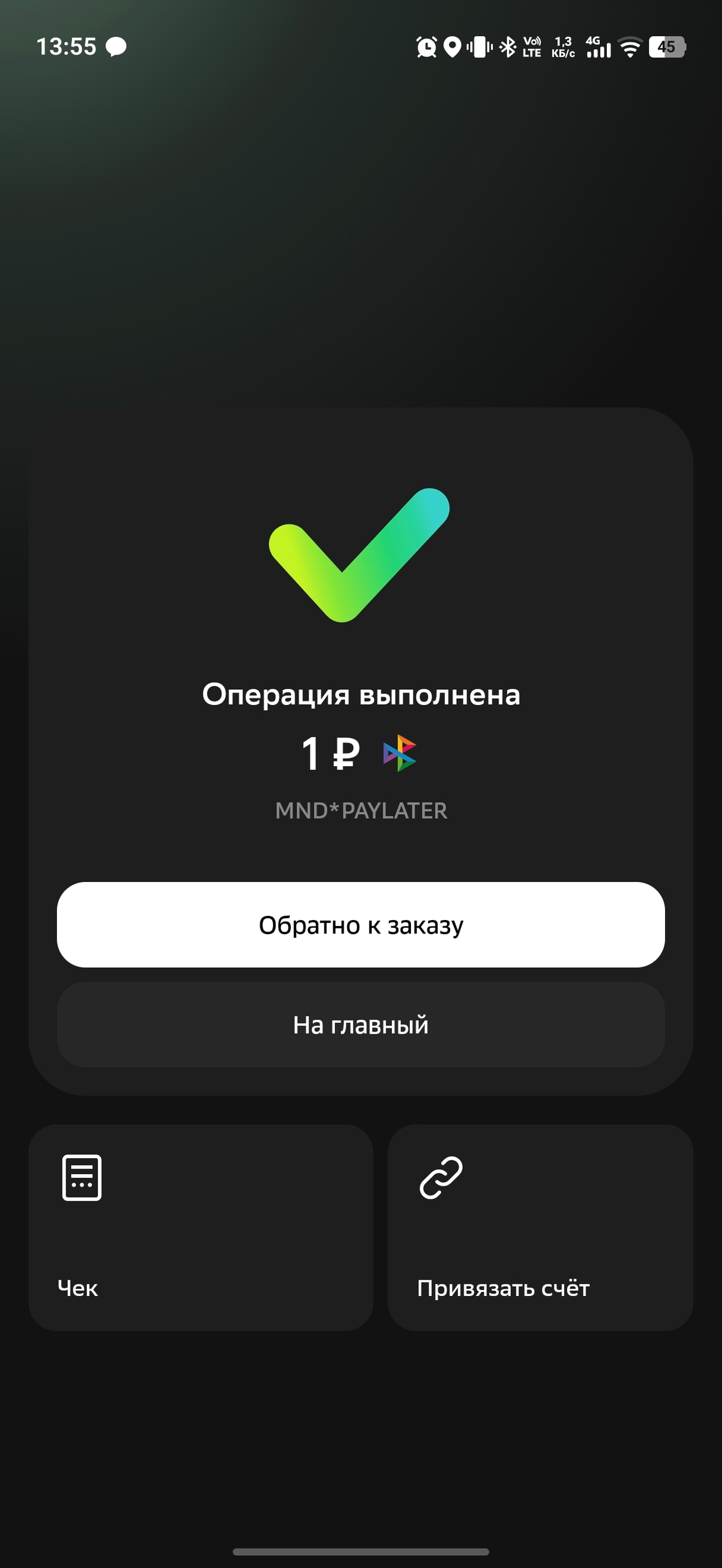
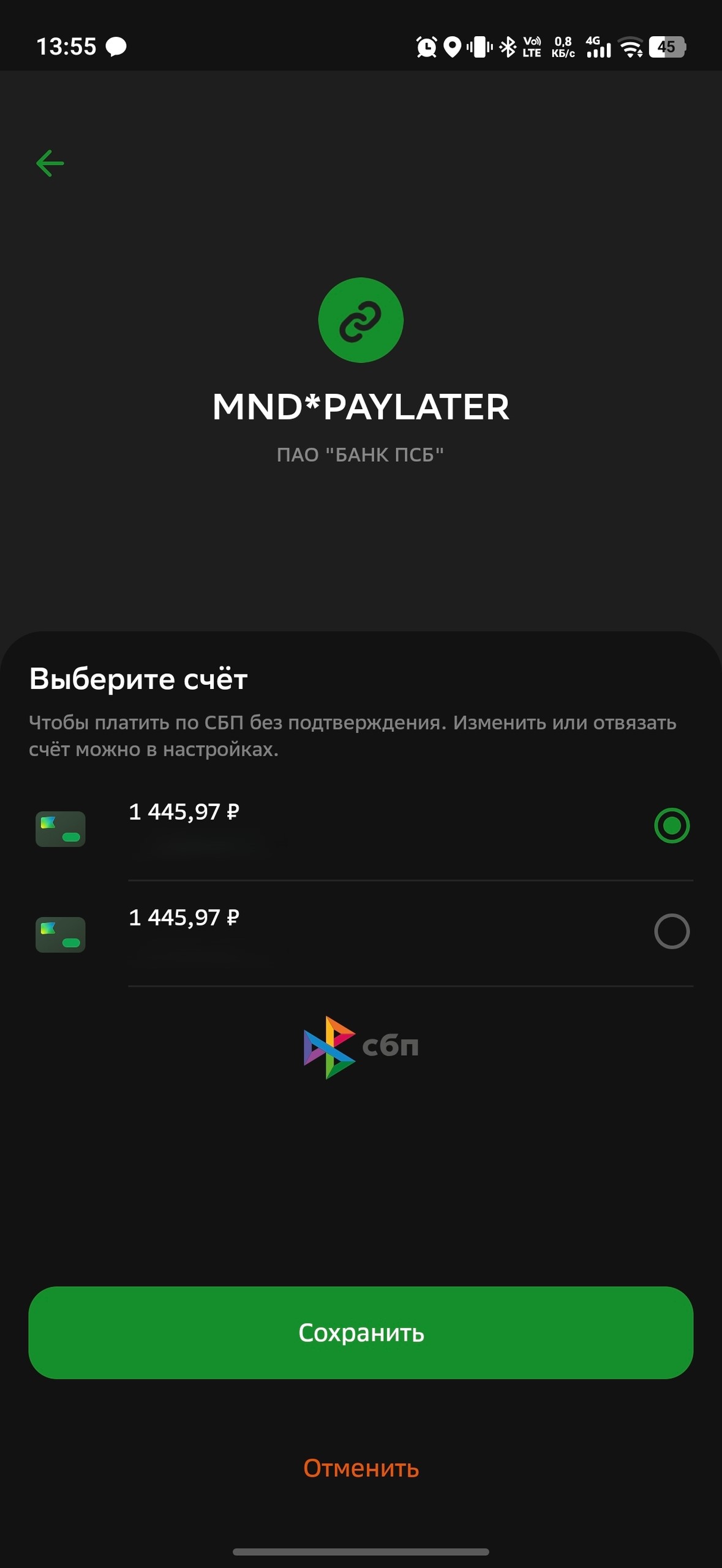
Recurring write-offs via the SBP are performed by calling the API method with the rebill id of a previously completed successful transaction (pay) via the SBP specified.
The transaction is performed in asynchronous mode. As a result of the request, you will receive a payment id, and asynchronously callback notification.
| Parameter | Required | Parameter | Required | |
|---|---|---|---|---|
| payment | Yes | customValues[] | No | |
| payment.action | Yes | customValues[].name | No | |
| payment.orderId | Yes | customValues[].value | No | |
| payment.price | Yes | metadata | No | |
| target | Yes | urls | No | |
| target.rebill | Yes | urls.return | No |
Synchronous response and asynchronous callback-notification can contain a wider set of parameters compared to the example.
POST https://secure.mandarinpay.com/api/transactions
{
"payment": {
"action": "pay",
"orderId": "your_unique_order_id",
"price": "1000.00"
},
"target": {
"rebill": "43913ddc000c4d3990fddbd3980c1725"
},
"customValues": [
{"name": "first parameter to save and show", "value": "p1"},
{"name": "second parameter to save and show", "value": "p2"}
],
"metadata": {
"first_parameter_to_callback_and_not_to_show": "p1",
"second_parameter_to_callback_and_not_to_show": "p2"
},
"urls": {
"callback": "http://...",
"return": "http://..."
}
}
Response in case of successful transaction creation (200 OK)
{
"id": "43913ddc000c4d3990fddbd3980c1725"
}
# Bulk recurring payment
For bulk recurring payment use "action": "pay" and id of the previously successful tokenizations of full card data or id of a previously successful transactions (opens new window) (pay or preauth) as target.rebill.
As a result of the request, you will receive a list synchronously id payments, and asynchronously callback-notification.
| Parameter | Required | Parameter | Required | |
|---|---|---|---|---|
| payment | Yes | customValues[] | No | |
| payment.action | Yes | customValues[].name | No | |
| payment.orderId | Yes | customValues[].value | No | |
| payment.price | Yes | metadata | No | |
| target | Yes | urls | No | |
| target.rebill | Yes | urls.return | No | |
| CustomerInfo.email | If the fiscalInformation block is passed, this parameter is required. In other cases, you do not need to specify this parameter. | urls.callback | No | |
| customerInfo.phone | In case of transmission of the fiscalInformation block, this parameter is required. In other cases, you do not need to specify this parameter. |
Request for bulk recurring payments
POST https://secure.mandarinpay.com/api/transactions/bulk-force
[
    {
        "payment": {
            "orderId": "00000281",
            "action": "pay",
            "price": "200.00"
        },
        "urls": {
            "callback": "https://test.com"
        },
        "target": {
            "rebill": "86257b9c-05cb-4608-b79c-0fd62ad6fc15"
        }
    },
        {
        "payment": {
            "orderId": "00000282",
            "action": "pay",
            "price": "400.00"
        },
        "urls": {
            "callback": "https://test.com"
        },
        "target": {
            "rebill": "86257b9c-05cb-4608-b79c-0fd62ad6fc15"
        }
    },
        {
        "payment": {
            "orderId": "00000283",
            "action": "pay",
            "price": "500.00"
        },
        "urls": {
            "callback": "https://test.com"
        },
        "target": {
            "rebill": "86257b9c-05cb-4608-b79c-0fd62ad6fc15"
        }
    }
]
Response in case of successful transactions creation (200 OK)
[
    {
        "id": "58592b2520304d20800d993fe6a2b26a"
    },
    {
        "id": "ec2c99fbd72c401fbd11cd098354aa53"
    },
    {
        "id": "9362c8bf0bdd4edd906bf48934a9917f"
    }
]
Response if the transactions is not created (400 Bad request)
{
	"error": "Invalid request"
}
# Cancellation and return
# Cancel authorization
To release the authorized amount, use "action": "reversal" and the id received in the successful authorization notification as the value for target.transaction. The active participation of the payer is not required. Cancellations will be made for the entire authorized amount.
The transaction is carried out asynchronously. As a result of the request, you will receive payment id synchronously, and callback-notification will be sent asynchronously.
| Parameter | Required | Parameter | Required | |
|---|---|---|---|---|
| payment | Yes | customValues[] | No | |
| payment.action | Yes | customValues[].name | No | |
| payment.orderId | Yes | customValues[].value | No | |
| customerInfo | Yes | metadata | No | |
| customerInfo.email | Yes | urls | No | |
| customerInfo.phone | No | urls.return | No | |
| target | Yes | urls.callback | No | |
| target.transaction | Yes |
Synchronous response and asynchronous callback-notification can contain a wider set of parameters compared to the example.
Request
POST https://secure.mandarinpay.com/api/transactions
{
	"payment": {
		"action": "reversal",
		"orderId": "your_unique_order_id"
	},
	"customerInfo":
	{
		"email": "user@example.com",
		"phone": "+79001234567"
	},
	"target": {
		"transaction": "43913ddc000c4d3990fddbd3980c1725"
	},
	"customValues": [
		{"name": "first parameter to save and show", "value": "p1"},
		{"name": "second parameter to save and show", "value": "p2"}
	],
	"metadata": {
		"first_parameter_to_callback_and_not_to_show": "p1",
		"second_parameter_to_callback_and_not_to_show": "p2"
	},
	"urls": {
		"callback": "http://...",
		"return": "http://..."
	}
}
Response in case of successful transaction creation (200 OK)
{
	"id": "43913ddc000c4d3990fddbd3980c1725"
}
Response if the transaction is not created (400 Bad request)
{
	"error": "Invalid request"
}
# Payment cancellation
To cancel a successful transaction to debit funds from a card ("action": "pay"), use "action": "reversal" and the id of the previously completed transaction as target.transaction.
Cancellation is possible both for the entire transaction amount and for part of the amount (partial cancellation). An unlimited number of partial cancellations of one payment transaction is allowed within the payment amount. The active participation of the payer is not required.
The transaction is carried out asynchronously. As a result of the request, you will receive payment id synchronously, and callback-notification will be sent asynchronously.
| Parameter | Required | Parameter | Required | |
|---|---|---|---|---|
| payment | Yes | customValues[] | No | |
| payment.action | Yes | customValues[].name | No | |
| payment.orderId | Yes | customValues[].value | No | |
| payment.price | Yes | metadata | No | |
| target | Yes | urls | No | |
| target.transaction | Yes | urls.return | No | |
| urls.callback | No |
Synchronous response and asynchronous callback-notification can contain a wider set of parameters compared to the example.
Request
POST https://secure.mandarinpay.com/api/transactions
{
	"payment": {
		"action": "reversal",
		"orderId": "your_unique_order_id",
    	"price": "1000.00"
	},
	"target": {
		"transaction": "43913ddc000c4d3990fddbd3980c1725"
	},
	"customValues": [
		{"name": "first parameter to save and show", "value": "p1"},
		{"name": "second parameter to save and show", "value": "p2"}
	],
	"metadata": {
		"first_parameter_to_callback_and_not_to_show": "p1",
		"second_parameter_to_callback_and_not_to_show": "p2"
	},
	"urls": {
		"callback": "http://...",
		"return": "http://..."
	}
}
Response in case of successful transaction creation (200 OK)
{
	"id": "43913ddc000c4d3990fddbd3980c1725"
}
Response if the transaction is not created (400 Bad request)
{
	"error": "Invalid request"
}
# Accepting payments via SBP
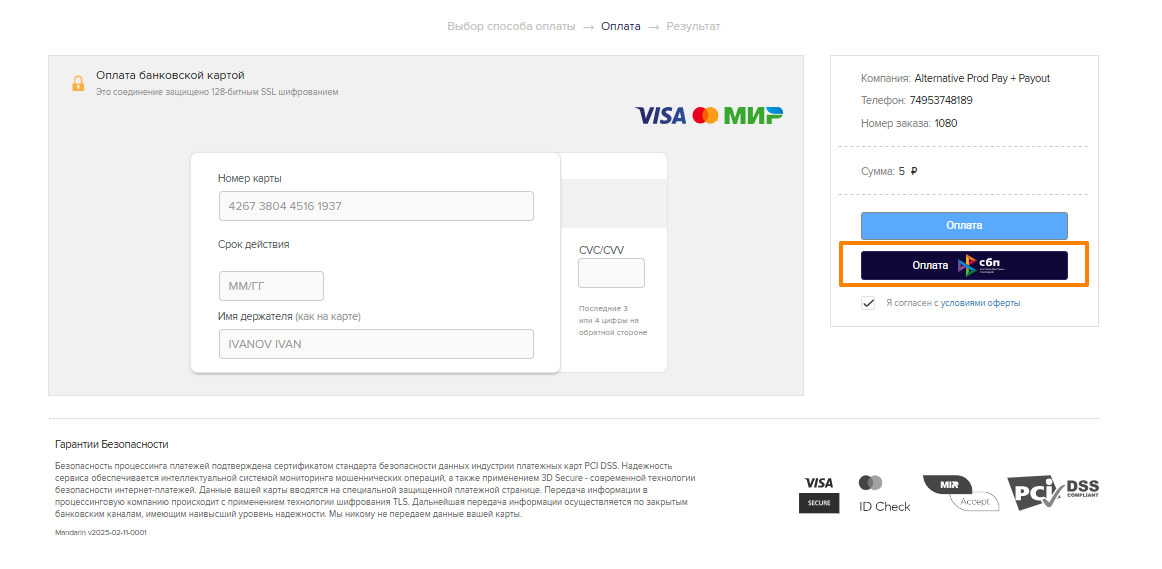
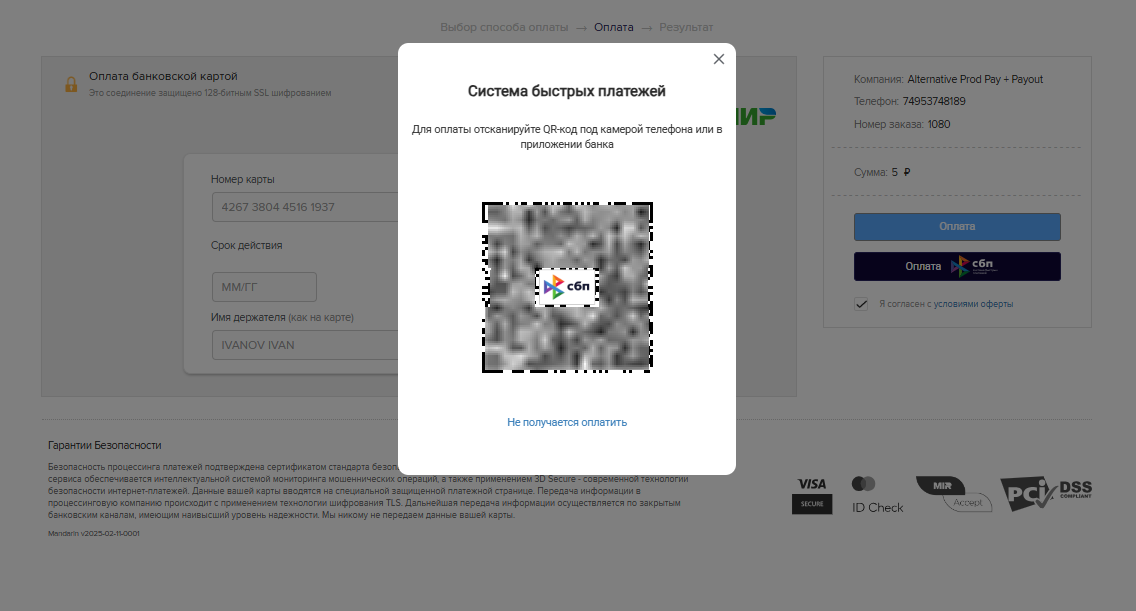
For the standard payment page, connecting SBP for accepting payments is done through technical support, the methods used are completely identical to the standard payment acceptance. More details at link.
When paying, the client will see the SBP Payment button, when clicked, a QR code for payment will open.
# Getting transaction status
The API method makes it possible to obtain its status, as well as information about the card, using the transaction identifier.
Authorization - XAuth (opens new window).
Request:
operationId - payment id (opens new window).
GET https://secure.mandarinpay.com/api/operations/{operationId}
Sample answer:
{
     "operationType": "Transaction",
     "state": "Success",
     "card": {
         "cardNumber": "519261XXXXXX3242",
         "cardHolder": "CARD HOLDER",
         "expireDate": "25/01",
         "cardId": "a3a5c49e1385e5096d05075d636f7baf",
         "country": "TUR",
         "productName": "Standard Mastercard Card",
         "productCode": "MCS",
         "brand": "mastercard",
         "bank": "ODEA BANK A.S.",
         "cardType": "Credit"
     }
}
Response options:
| Parameter | Description |
|---|---|
| operationType | operation type, transaction/binding |
| state | Operation status: success, failed, payout-only, pendingExecution/none/unknown - the operation has not been completed and is being processed (reconciliation with the acquiring bank may be required). Only the success status clearly indicates the success of the operation! |
| cardNumber | masked card number |
| cardHolder | card holder |
| expireDate | card expiration date |
| cardId | unique hash of the full card number |
| country | country of issue |
| productName | card product/card category |
| productCode | card product/card category code |
| brand | card payment system |
| bank | bank that issued the card |
| cardType | card type (debit/credit) |