# Basics
Mandarin is a universal solution for working with online payments. The Mandarin API is built on REST principles. With it, you can accept payments from bank cards, obtain a card token and use it for recurring debits, process refunds, make payouts to cards, and use many other options. The international payment systems MIR, Visa, MasterCard, and UnionPay International (UPI) (opens new window) are supported.
The API uses the HTTPS protocol and TLS version 1.2 or higher (requests over HTTP or TLS 1.0, 1.1 will be rejected), so it is suitable for development in any programming language that supports HTTPS libraries.
The API works with POST and GET requests. POST requests accept arguments in JSON; GET requests work with query strings. The response is always JSON, regardless of the request type.
The API is asynchronous (a small portion of requests work synchronously): for your request you synchronously receive a payment (request) identifier, and then asynchronously receive a callback notification that includes the payment (request) identifier received earlier, as well as the operation status and other related data.
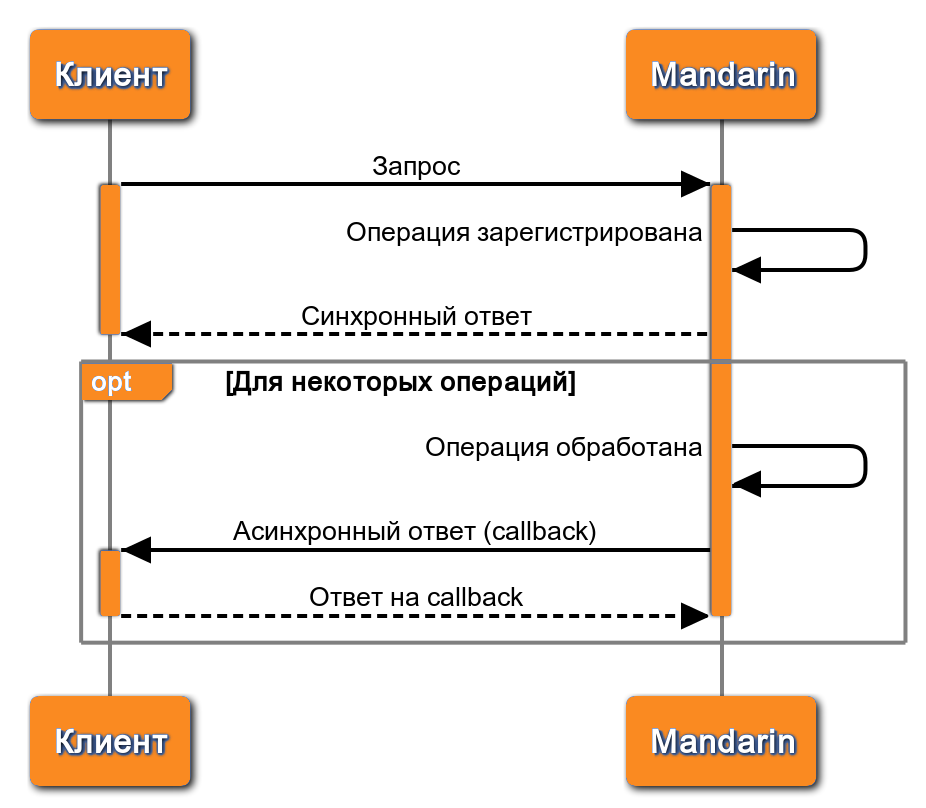
# Sandbox and production environment
The API is implemented in sandbox (test) and production environments. Requests created in the test environment are never passed to banking information systems and therefore do not result in real transactions. In some cases, it is also possible to work in the production API environment with mocks that simulate the behavior of banking systems.
Behavior depends on the service:
- Main Public API (payments, payouts, tokenization) — the environment is determined by credentials: a test
Secretgives sandbox, a production one gives production. The API URL is the same. - Simplified identification, self-employed, BaaS, and other services — access to the test environment and OAuth applications is configured by Support (opens new window). Check the connection procedure in the Testing section.
Test requests do not result in real transactions in banking systems.
# Request authentication
The method depends on the API in use.
# X-Auth
Used in the main Public API: payment acceptance, payouts, tokenization, simplified identification.
Each request includes the X-Auth header — a string composed of merchantId, a signature, and a unique requestId. The signature is calculated as SHA256 of merchantId, requestId, and Secret. This lets Mandarin verify that the request was sent by the account owner and protects against reuse of the same request.
Credentials (merchantId and Secret) are taken from the personal account.
Request authentication is performed using an authorization string passed in the X-Auth header parameter.
The X-Auth value is formed according to the following template:
merchantId-SHA256(merchantId-requestId-secret)-requestId, where:
merchantId– MID specified in the personal account.requestId– unique request number. To ensure uniqueness, we recommend using the current timestamp in milliseconds or bytes generated by a cryptographically secure random number generator.secret– Secret specified in the personal account.
API requests without a header or with an incorrect header, including an incorrect X-Auth, will be rejected without creating transactions.
Examples of calculating X-Auth
<?php
function gen_auth($merchantId, $secret)
{
        $reqid = time() ."_". microtime(true) ."_". rand();
        $hash = hash("sha256", $merchantId ."-". $reqid ."-". $secret);
        return $merchantId ."-".$hash ."-". $reqid;
}
?>
public static string GenerateXAuth(string secret)
{
  var requestId = Guid.NewGuid().ToString("N");
    string hash;
    using (var sha256 = System.Security.Cryptography.SHA256.Create())
        hash = BitConverter.ToString(sha256.ComputeHash(Encoding.UTF8.GetBytes($"{merchantId}-{requestId}-{secret}"))).ToLower().Replace("-", "");
    return $"{merchantId}-{hash}-{requestId}";
}
# OAuth 2.0 (Bearer)
Used in Business API, self-employed API, and BaaS (routing).
First, an access_token is requested via OAuth 2.0 with the client_credentials grant, then it is passed in the Authorization: Bearer {token} header. The token is valid for a limited time (usually 10 hours); after it expires, you must request it again.
client_id and client_secret are issued by Support (opens new window).
For more details, see Business API, Self-employed, BaaS.
Token request
Includes mandatory form-data parameters passed in the request body (the application.client_id and application.client_secret parameters are fixed for the application and stored on the client side).
| Parameter | Description | Example |
|---|---|---|
| grant_type | Authorization grant (always client_credentials). | client_credentials |
| client_id | Client identifier (equals the application.client_id value provided by Mandarin). | VvPtlhcyldKtkuoUWY42 pErdrj4er2AwFoBWrn8n |
| client_secret | Client secret password (equals the application.client_secret value provided by Mandarin). | uQfOIMsltZYL8x3XMqUGP5 iFM59PyFnKlN0UmD3Ihre2 Ry3AGazUAv5jPdUI4dBJqV 0Of6b9GFvWvzGahYnq2aVV xkxn9n4qWF57FP0C01Kp6l EtajhfYv3UZ2f4pAZ7 |
| scope | Requested scopes (access areas): for example, transactions.read — "Read transactions". Separator — space. You can request any list of scopes; the response will contain the subset of requested scopes that can be granted for this application. | transactions.read |
curl --request POST \
  --url https://accounts.mandarin.io/oauth/token/ \
--form 'grant_type=client_credentials' \
--form 'client_id={{client_id}}' \
--form 'client_secret={{client_secret}}' \
--form 'scope=transactions.read'
Response
| Parameter | Description | Example |
|---|---|---|
| access_token | Token (access key). | VnuxZiW14mXBedDeZO7d W7GBmzPxMn |
| expires_in | Token lifetime (in seconds). Always 36,000 seconds (10 hours). | 36000 |
| token_type | Token type (always Bearer). | Bearer |
| scope | Allowed scopes (access areas): for example, transactions.read — "Read transactions". Separator — space. You can request any list of scopes; the response will contain the subset of requested scopes that can be granted for this application. | transactions.read |
{
    "access_token": "VnuxZiW14mXBedDeZO7dW7GBmzPxMn",
    "expires_in": 36000,
    "token_type": "Bearer",
    "scope": "transactions.read"
}
Using the token
Specify it in the headers of each request, in the Authorization field, after the reserved word Bearer.
Authorization:Bearer VnuxZiW14mXBedDeZO7dW7GBmzPxMn
# X-Api-Key
Used in the unified payment form API (invoice creation).
The API key is created in the personal account in payment link settings (the Integration section) and passed in the Authorization: X-Api-Key: {key} header.
For more details, see Quick start — unified payment form.
# Callback notifications
Notifications from Mandarin to your callbackUrl are signed with the sign field. Verify the signature on your side before processing the operation status.
To confirm that the notification came from Mandarin and that the data in the notification was not tampered with, you must verify the sign parameter value.
The sign field is a SHA256 hash of the values of all notification parameters, sorted alphabetically, and the secret value, separated by -.
PAY ATTENTION
To verify sign, all notification parameters must be sorted in alphabetical order using the standard sorting algorithm of your programming language.
To verify the correctness of the sign calculation, you can use a special utility (opens new window).
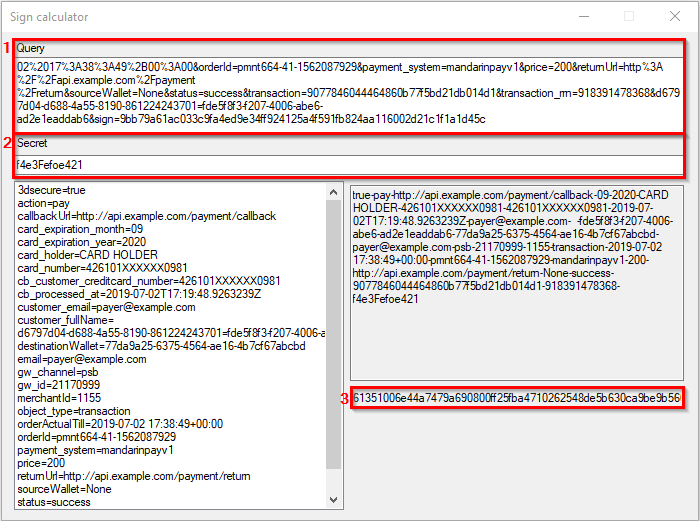
- Paste the
callbackbody into field (1); - Paste the
secretinto field (2); - The
signvalue will be calculated automatically in field (3).
# Notification parameters
Content-Type for asynchronous notifications is application/x-www-urlencoded.
Notifications are sent as a POST request to the address passed in the corresponding request in the optional parameter urls.callback.
If the parameter was not passed, the address specified in the personal account on the Integration tab is used for the POST request.
IMPORTANT!
The number of parameters in a callback notification may change. New parameters may be added. In addition, each notification includes a "salt" (a parameter name and value with random data).
Therefore, it is important not to hardcode the set of parameters!
List and description of parameters sent in a callback notification
The object_type parameter stores the type: transaction (Payment / Payout) or card_binding (Card tokenization). Depending on its value, the set of other parameters changes!
Parameters in the POST request are passed in x-www-form-urlencoded format.
| Parameter | Required | Description |
|---|---|---|
| 16797d04-d688-4a55-8190-861224243701 | Yes | Salt (UUID for the parameter name and value are generated randomly). |
| 3dsecure | No | Indicator of payment confirmation via 3-D Secure code entry. |
| action | No | Action (payment pay, authorization auth, preauthorization preauth, payout payout, refund reversal), relevant only for transactions. |
| callbackUrl | No | Address for sending the callback. |
| card_binding | No | Card token in the system, relevant only for tokenizations. |
| card_expiration_month | No | Card expiration month. |
| card_expiration_year | No | Card expiration year. |
| card_holder | No | Cardholder (URL-encoded). |
| card_id | No | Hash of the full card number (for tokenizations and payments). |
| card_info_bank | No | Issuing bank name (URL-encoded). |
| card_info_country | No | Issuing bank country (ISO 3166-1 alpha-3 (opens new window) format). For example, RUS. |
| card_info_type | No | Card international payment system name. For example, mastercard. |
| card_info_card_type | No | Card type. For example, Debit. |
| card_info_product_name | No | Card product name. For example, Visa Rewards. |
| card_info_product_code | No | Card product code. For example, N1. |
| card_info_issuing_bank | No | Issuing bank. For example, Tinkoff Bank. |
| card_info_iso_country_a3 | No | Card issuing country. For example, RUS. |
| card_number | No | Card number (masked). |
| cb_customer_creditcard_number | No | Card number (masked); this field will be removed in future versions. |
| cb_processed_at | No | Date and time of operation processing. |
| customer_fullName | No | User full name. |
| customer_email | No | User email address. |
| customer_phone | No | User phone number. |
| customName0 | No | Name of the first parameter (URL-encoded) passed in the customValues array in the payment or tokenization request. Up to 8 parameters may exist: customName0, customName1, ... , customName7. |
| customValue0 | No | Value of the first parameter (URL-encoded) passed in the customValues array in the payment or tokenization request. Up to 8 parameters may exist: customValue0, customValue1, ... , customValue7. |
| No | User email. | |
| error_code | No | Error code. Absence of a code does not guarantee operation success! |
| error_description | No | Error description. |
| gw_channel | No | Fund transfer channel name. |
| gw_id | No | Fund transfer channel ID. |
| initial_hold_amount | No | Authorization amount; required only for tokenizations. |
| merchantId | Yes | Merchant ID. |
| metadata_* | No | Parameters passed in the metadata object in the payment or tokenization request. They have the metadata_ prefix. |
| object_type | Yes | Object type (payment/payout transaction or tokenization card_binding). |
| orderActualTill | No | Product/service reservation period. After the specified date, payment will not be possible. |
| orderId | Yes | Unique order number in your system. |
| payment_system | No | Constant mandarinpayv1; this field will be removed in future versions. |
| price | No | Payment amount; required only for transactions. |
| returnUrl | No | Store address for redirect after the operation completes. |
| status | Yes | Operation status: success, failed, payout-only. Only the success status unambiguously indicates operation success! |
| transaction | No | Transaction ID in the system. Relevant only for transactions. |
| transaction_rrn | No | Transaction RRN. |
| sign | Yes | Authentication signature (always last). |
# Parameters in the metadata object
A tokenization or payment request may include a metadata object containing a list of your parameters with any names and values that will be sent in the callback notification.
They will not be shown to the user on the payment page.
For example, for a tokenization request:
POST https://secure.mandarinpay.com/api/card-bindings
{
	"customerInfo": {
		"email": "user@example.com",
		"phone": "+79001234567"
	},
	"metadata": {
		"first_param": "p1",
		"second_param": "p2"
	}
}
Read more about using the metadata object in requests in Saving additional information.
The callback notification, along with other parameters, will include parameters from the request with the metadata_ prefix:
metadata_first_param=p1&metadata_second_param=p2
# Notification examples
Example callback notification for a payment
merchantId=1&orderId=e75c444d-22b4-4e1c&email=79691112211%40mail.ru&orderActualTill=2024-01-30%2006%3A59%3A28Z&price=100.00&callbackUrl=https%3A%2F%2test.ru%2Fpayment%2F60e70526%2Fe75c444d-22b4-4e1c%2Fpayment%2F&action=pay&customer_fullName=%20%20&customer_phone=%2B79691112211&customer_email=79691112211%40test.ru&transaction=1a79f7d8122048929299a7ee87aed&object_type=transaction&status=failed&payment_system=mandarinpayv1&card_number=220220XXXXXX1111&cb_customer_creditcard_number=220220XXXXXX1111&gw_channel=psb_direct&transaction_rrn=402822221111&error_code=51&error_description=Not%20sufficient%20funds&gw_id=107211111&card_id=7c5d587672909558a075fd11111111&e72d8031-d96f-4d1f-953d-779cb693ad7d=65ce05ec-f35a-4f1f-b00c&sign=b6c39660225e7e4d22b7ce535edc
Example callback notification for full card data tokenization
card_binding=a7446082-02a4&card_holder=ALEKSANDR%20IVANOV%20&card_number=427605XXXXXX1111&card_expiration_year=2023&card_expiration_month=2&object_type=card_binding&status=success&merchantId=1&initial_hold_amount=1.00000&3dsecure=true&gw_id=1072811&card_id=99bb78de64def70b063c11111&card_info_country=RUS&card_info_type=visa&card_info_bank=SBERBANK&card_info_product_name=Visa%20Classic&card_info_product_code=F&card_info_card_type=Debit&card_info_issuing_bank=SBERBANK&card_info_iso_country_a3=RUS&9870f8a5=8f5b0fe8-a587-4de0ea9808dc&sign=8eada97da58c5287f4b08a2e75dd0fe1111
Example callback notification for tokenization with payout-only status
card_binding=9b2980ab-6247&card_holder=HALVA%20CARD&card_number=553609XXXXXX1111&card_expiration_year=27&card_expiration_month=1&object_type=card_binding&status=payout-only&merchantId=1&initial_hold_amount=1.00000&3dsecure=true&gw_id=1111&card_id=3e8dd9d3265221111111&card_info_country=RUS&card_info_type=mastercard&card_info_bank=Sovcombank&card_info_product_name=Mastercard%20World%20Card&card_info_product_code=MNW&card_info_card_type=Credit&card_info_issuing_bank=Sovcombank&card_info_iso_country_a3=RUS&0e5d3ca6-=9317d7e6-6d29-4d34-af62-1&sign=e8867ef06f61ab00465336275c5b1111111
Example callback notification for a payout using a card token
merchantId=1&orderId=112244&email=test%40mail.ru&orderActualTill=2024-01-30%2007%3A33%3A39Z&price=100&action=payout&customer_fullName=%20%20&customer_phone=%2B7911111111&customer_email=test%40mail.ru&transaction=3d1d4a7c2f794e479e2cdd351111111&object_type=transaction&status=failed&payment_system=mandarinpayv1&gw_channel=psb_direct&transaction_rrn=4028471111111&error_code=51&error_description=Not%20sufficient%20funds&gw_id=107281111&card_id=811d78e08b41ce51e450eb81111111&fe18a06c-e010-4a07-985e-1111111=3bd5e84b-f3f2-41d7-86ed-e994a7336144&sign=91feebac525892a32d8effe11111111
Example callback notification for a payout using a card number
merchantId=1&orderId=9537D957-AC43-4853-AB47-4E39BCFFF3FC&email=sadukin%40mail.ru&orderActualTill=2021-02-22%2010%3A48%3A17Z&price=2000.0&callbackUrl=http%3A%2F%2Fmail.example.com%3A4000%2Fapi%2Fmandarin%2Fpayout%2Fcallback&action=payout&customName0=manager_id&customValue0=E099D738-CED4-48F2-A21C-36C0EA25A549&customName1=dealer_id&customValue1=BD251868-EACA-483D-91F3-954543576F93&customName2=customer_id&customValue2=A54856FA-3A81-4742-AA73-743389D536A9&customer_fullName=%20%20&customer_phone=%2B79273884129&customer_email=sadukin%40mail.ru&transaction=52f1874b9bd846e7ab14c9f96fb9bc17&object_type=transaction&status=success&payment_system=mandarinpayv1&cb_processed_at=2021-02-20T10%3A48%3A22.7232790Z&card_number=546906XXXXXX1568&cb_customer_creditcard_number=546906XXXXXX1568&gw_channel=open_way4&transaction_rrn=105199356489&error_code=51&error_description=Not%20sufficient%20funds&gw_id=39104021&709b674c-1f5e-424d-841e-1244d7b71041=9ee4b553-f961-4da9-b9dc-0924c0260d33&sign=a63189b75147a8bd2326baaacdd482d902206b5b6fe6de5f0df464e698b47912
Example callback notification for authorization in two-stage payment
merchantId=1&orderId=11&email=test%40mail.ru&orderActualTill=2024-01-24%2017%3A22%3A24&price=1&callbackUrl=https%3A%2F%2Fwww.test.ru%2Fother%2Fcompany%2Fpaymenthold.php&action=preauth&customName0=tcustomValue0=test&customer_fullName=test&customer_phone=%2B797881111111&customer_email=test%40mail.ru&metadata_inv_id=36&transaction=3c35c083f7eb4bed8373b9341111111&object_type=transaction&status=failed&payment_system=mandarinpayv1&sandbox=false&error_code=888&error_description=Order%20expired&faeef3a9-1095-4513-b6f9-504cf3920c0a=ae7db577-1fac-4154-9a8e-11111111&sign=b57daf7804f7e252235f6901c435ac8f1e10063aba518d034617db31111111
Example callback notification for a refund
merchantId=1&orderId=11&email=test%40mail.ru&orderActualTill=2024-03-10%2004%3A55%3A08Z&price=999.00&action=reversal&customer_fullName=%20%20&customer_phone=%2B79690000099&customer_email=test%40mail.ru&transaction=2f0006a3ed00000fae177e29aba7bb00&object_type=transaction&status=success&payment_system=mandarinpayv1&cb_processed_at=2024-03-08T05%3A01%3A17.7798144Z&gw_channel=psb_direct&transaction_rrn=401117511111&gw_id=111111143&card_id=d8632ed1111148b37a11111010611111&433a288b-de02-461c-aac6-9d328311111=e93e7a57-1111-1111-1111-37ae0da11111&sign=85b5a211111b2b9482111118c5035311111f856a111a83c89ee111116cbfc8
Examples of verifying sign
<?php
function check_sign($secret, $req)
{
        $sign = $req['sign'];
        unset($req['sign']);
        $to_hash = '';
        if (!is_null($req) && is_array($req)) {
                ksort($req);
                $to_hash = implode('-', $req);
        }

        $to_hash = $to_hash .'-'. $secret;
        $calculated_sign = hash('sha256', $to_hash);
        return $calculated_sign == $sign;
}

check_sign("123", $_POST);
?>
public static string Calculate(string secret, IDictionary<string, string> values)
{
    using (var sha256 = System.Security.Cryptography.SHA256.Create())
        return BitConverter.ToString(sha256.ComputeHash(Encoding.UTF8.GetBytes(string.Join("-", values.OrderBy(x => x.Key, StringComparer.Ordinal).Select(x => x.Value)) + "-" + secret))).ToLower().Replace("-", "");
}

public static bool CheckSign(string secret, HttpRequest request)
{
    var sign = request.Form["sign"];
    if(string.IsNullOrWhiteSpace(sign))
      return false;
    return sign ==
        Calculate(secret, request.Form.Keys.Where(k => k != "sign").ToDictionary(k => k, k => request.Form[k]));
}
# Resending notifications
As a response indicating that the callback was successfully processed on your side, you must return HTTP status code 200 and body OK to Mandarin.
IMPORTANT!
Any other response means the callback was not processed on your side. In that case, Mandarin retries sending the notification:
- the first retry — approximately 10 minutes after an unsuccessful response;
- then the interval doubles: 20 minutes, 40 minutes, 80 minutes, and so on;
- retries continue until a response with HTTP status code
200and bodyOKis received, or until 3 days elapse — whichever comes first.
# Requests
# Entry points
Entry points for sandbox and production environments are the same.
Mandarin determines the environment from authentication credentials (specifically, the Secret value).
It is important to use TLS version 1.2 or higher (requests with TLS 1.0 or 1.1 will be rejected).
Entry point for creating transactions
Used for all main operations (for example, payment acceptance and payouts to card).
POST https://secure.mandarinpay.com/api/transactions
Entry point for card tokenization
Used only for card tokenization.
POST https://secure.mandarinpay.com/api/card-bindings
Entry point for simplified identification
The identification process differs significantly from the others and is described on a separate page. It uses the standard Mandarin authentication method.
POST https://secure.mandarinpay.com/api/personidentification
# Request parameters
Content-Type for requests is application/json.
You can download the Postman collection, which already includes all requests from this section.
| Parameter | Type | Description and possible values | Where used (action) |
|---|---|---|---|
| payment | object | Object containing transaction data. | pay, auth, preauth, reversal, payout |
| payment.action | string | Transaction type. Possible values: pay - Payment; auth - Authorization; preauth - Preauthorization; reversal - Transaction cancellation; payout - Payout. | pay, auth, preauth, reversal, payout |
| payment.orderId | string | Order number in your system. Must be unique among successful operations! | pay, auth, preauth, reversal, payout |
| payment.price | string | Payment amount. Separator — dot. | pay, auth, preauth, reversal, payout |
| payment. orderActualTill | string | Product/service reservation period. After the specified date, payment will not be possible. Format: 2020-02-20 12:34:56+00:00. If the parameter is not specified, the standard period of 48 hours applies. | pay, auth, preauth |
| customerInfo | object | Object containing user data. | pay, auth, preauth, reversal, payout, card-binding |
| customerInfo. email | string | User email. Format: user@example.com. | pay, auth, preauth, reversal, payout, card-binding |
| customerInfo. phone | string | User phone number in Russian Federation format: +79001234567. | |
| target | object | Object containing a reference to an existing transaction/card token. | pay, reversal, payout, card-binding |
| target.transaction | string | Identifier of the existing transaction referenced by the new one. | pay, reversal |
| target.card | string | Card token (for example, for recurring payments). | pay, payout |
| target. knownCardNumber | string | Card number to which the payout is made. | payout, card-binding |
| destination | object | Object containing a reference to the token/card number to which funds are transferred in a card2card transaction. | card2card |
| destination.card | string | Card token to which funds are transferred in a card2card transaction. | card2card |
| destination.knownCardNumber | string | Card number to which funds are transferred in a card2card transaction. | card2card |
| source | object | Object containing a reference to the card token from which funds are debited in a card2card transaction. | card2card |
| source.card | string | Card token from which funds are debited in a card2card transaction. | card2card |
| allowinteractive | boolean | Indicator of an interactive (payer-involved) payment when payment without payer involvement is not possible. Supported only in Mandarin Custom Pay. When used, always true: "allowinteractive": true | pay |
| interactive | boolean | Indicator of an interactive (payer-involved) payment. Supported only in Mandarin Custom Pay. When used, always true: "interactive": true | pay |
| customValues[] | array | Array containing additional payment information. May contain up to 8 parameter pairs. Each parameter is displayed to the payer in the right block of the payment page. | pay, auth, preauth, reversal, payout |
| customValues[]. name | string | Parameter title (displayed in the right block of the payment page). | pay, auth, preauth, reversal, payout |
| customValues[]. value | string | Parameter value (displayed in the right block of the payment page). | pay, auth, preauth, reversal, payout |
| metadata | object | Object containing a list of your parameters with any names and values that will be sent in the callback notification. Parameters are not displayed in the payer user interface. Parameter names cannot contain spaces! | pay, auth, preauth, reversal, payout |
| urls | object | Object containing URLs. If absent, URLs from settings are used. | pay, auth, preauth, reversal, payout, card-binding |
| urls.return | string | URL for redirecting the user after payment. The user is redirected to the specified URL after clicking "Return to site" on the payment page, or automatically after successful payment. Automatic redirect is disabled by default; contact Technical Support (opens new window) to enable it. | pay, auth, preauth, reversal, payout, card-binding |
| urls.callback | string | URL for sending a callback notification about transaction status. | pay, auth, preauth, reversal, payout, card-binding |
| fiscalInformation | object | Object containing fiscal information for the online cash register. | pay |
| fiscalInformation. taxationSystem | string | Taxation system. Possible values: Common - General (OSN); Simplified - Simplified (USN) "Income"; SimplifiedMinusOutlay - Simplified (USN) "Income minus expenses"; UnifiedImputedIncome - Unified tax on imputed income (UTII); UnifiedAgricultural - Unified agricultural tax (UST); Patent - Patent (PSN). | pay |
| fiscalInformation. items[] | array | Array of receipt lines. | pay |
| fiscalInformation. items[].description | string | Product name. | pay |
| fiscalInformation. items[].quantity | string | Quantity or weight. Separator — dot. | pay |
| fiscalInformation. items[].totalPrice | string | Amount (price × quantity). Separator — dot. | pay |
| fiscalInformation. items[].vat | string | VAT rate. Possible values: None - No VAT; Vat0 - VAT at 0%; Vat10 - VAT at 10%; Vat20 - VAT at 20%. | pay |
TESTING
Test data is available in the Payment services section.
# Saving additional information
You can pass additional payment information in the request.
The customValues array may contain up to 8 parameter pairs that are displayed to the payer in the right block of the payment page. The metadata object may contain json with any field names and values; they are not displayed to the payer.
For example, a lending organization accepts monthly payments from its clients.
The customValues array may contain the contract number and the fee charged to the payer. Let the metadata object contain the source (source) from which the payer opened the payment page and the notification send date (sent_at).
The synchronous response and asynchronous callback notification may contain a broader set of parameters compared to the example.
Request
POST https://secure.mandarinpay.com/api/transactions
{
	"payment": {
		"action": "pay",
		"orderId": "your_unique_order_id",
		"price": "1030.00"
	},
	"customerInfo": {
		"email": "user@example.com",
		"phone": "+79001234567"
	},
	"customValues": [
		{"name": "Номер договора", "value": "К-12345-789"},
		{"name": "Комиссия", "value": "30.00"}
	],
	"metadata": {
		"source": "email",
		"sent_at": "2020-01-31"
	},
	"urls": {
		"callback": "http://...",
		"return": "http://..."
	}
}
Response when the transaction is created successfully (200 OK)
{
	"id": "43913ddc000c4d3990fddbd3980c1725",
	"userWebLink": "https://secure.mandarinpay.com/Pay?transaction=0eb51e74-e704-4c36-b5cb-8f0227621518",
	"jsOperationId": "9874694yr87y73e7ey39ed80"
}
Response when the transaction is not created (400 Bad request)
{
	"error": "Invalid request"
}
DATA PROCESSING
Values of value from the customValues array are stored in parameters cs2, cs3, cs4, cs5, cs6, cs7, cs8, cs9 in the order they were passed (if not passed, values are empty). They are part of the payment transaction and are available from the personal account, in the callback notification, etc.
The metadata block may have a complex structure. It is returned only in the callback notification exactly as passed. This information is not stored afterward.
# Synchronous responses
# HTTP status codes
Mandarin uses standard HTTP status codes to indicate success or failure of API requests.
| Code | Description |
|---|---|
2xx | Request processed. |
4xx | Parameters passed by the client are incorrect (missing required format, malformed header, etc.). For example, 401 on authorization error. |
5xx | Internal error on Mandarin side (a fairly rare case). |
# Response parameters
| Parameter | Required | Description |
|---|---|---|
| id | Yes | Identifier of the created operation or card token |
| userWeblink | No | Link for redirecting the user when working with the payment page |
| jsOperationId | No | Operation identifier for use with Mandarin Custom Pay |
| error | No | Textual error description |
Each API call has an associated identifier called Transaction ID, passed in the synchronous response as the id parameter value. For a tokenization request it is the card token; for a payment/payout request it is called Transaction ID. It is also present in the callback notification as the transaction field value (for payments/payouts) or card_binding (for tokenizations).
Transaction ID (also called Payment ID) is also available in the transaction table via the link in the personal account (opens new window) and in the HeartBeat interface.
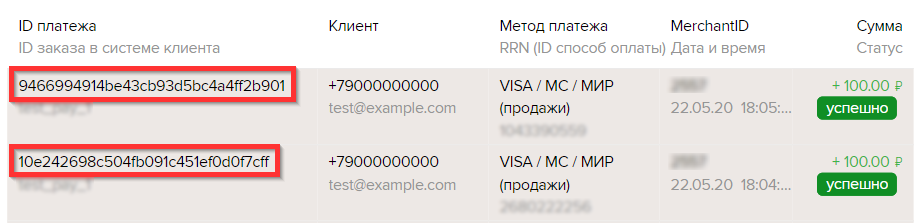
TIP
When contacting Support (opens new window) about a specific transaction, provide its Transaction ID! This will significantly speed up getting a response.
After receiving the synchronous response, there are three possible actions:
- To use the payment page
Redirect the user to the link received asuserWebLink(details) - To use the embeddable Mandarin Custom Pay form
Use the value fromjsOperationIdasoperationId(details) - No further action required
In this case, the synchronous response will contain onlyid.
Response when the transaction is created successfully (200 OK)
{
	"id": "43913ddc000c4d3990fddbd3980c1725",
	"userWebLink": "https://secure.mandarinpay.com/Pay?transaction=0eb51e74-e704-4c36-b5cb-8f0227621518",
	"jsOperationId": "9874694yr87y73e7ey39ed80"
}
Response when tokenization succeeds (200 OK)
{
	"id": "0eb51e74-e704-4c36-b5cb-8f0227621518",
	"userWebLink": "https://secure.mandarinpay.com/CardBindings/New?id=0eb51e74-e704-4c36-b5cb-8f0227621518",
	"jsOperationId": "binding-4994591t5-194t694159t-43t5345"
}
Response when the transaction is not created (400 Bad request)
{
	"error": "Invalid request"
}
# API request limits
Restrictions and limits for API requests:
Recurring payments: no more than 10 requests per second and no more than 300 requests per minute.
Refunds: maximum refund amount and maximum number of refunds (set per client request).
Payments: purchase limit (set per client request).
# Preparation and tools
# Authentication data
To start working with Mandarin, you need to register, get your account activated by a client manager, and sign in via the link to the personal account (opens new window).
To obtain MID and Secret in the personal account, follow the instructions (opens new window)
IMPORTANT!
Note that the secret key (Secret) must never leave your server in any form. If it is passed as part of HTML or used in JavaScript in any way, this is a security issue and allows an attacker to make calls to the payment system on your behalf.
For additional security, for each MID you can enable the option to accept requests only from IP addresses on an allowlist (opens new window) (white list). This can be enabled on request to Support (opens new window).
# Monitoring requests and notifications (HeartBeat)
HeartBeat (opens new window) is a tool for monitoring payment transactions and asynchronous notifications (callbacks). Standard authorization is used to sign in.
Features:
Monitoring payment transaction requests: link to HeartBeat — Transactions (opens new window).
Monitoring bank card tokenizations: link to HeartBeat — Tokens (opens new window).
Monitoring callback notifications for which Mandarin did not receive a
200 OKresponse from you: link to HeartBeat — Notifications (opens new window).Bulk payout registry service: link to HeartBeat — Payouts (opens new window).
More detailed information is in the guide (opens new window)