# Custom Form
# Built-in form for processing card data
The built-in form of processing card data allows for full integration into your interface, and there are no requirements for compliance with the PCI DSS bank card security standard.
When creating your payment page and integrating the form into it, you should remember that if you transfer commissions to the payer, in the Custom Form interface you must indicate “Payment service commission” or “Commission for card payment,” depending on who takes the commission (Mandarin or your service), since Custom Form is a White label solution. For example, “Amount to be paid: 3060.0 rub. (including payment service commission 60.0 rub.).”
A Custom Form is a form with fields that are actually separate pages iniframe. Accordingly, you can style everything that surrounds the fieldsiframe.
This form consists of two parts: html code, which is a layout of future fields, consisting of elementsdivwith classes indicating which element the corresponding field will be placed iniframe, surrounded by an elementformwith a unique identifier (arbitrary). A button, link or other element is also added to the form, serving as a form submission trigger.
To start drawing the form, you need to create a transaction according to the instructions - payment, payment
# Basic principles of form
In its simplest form, the form looks like this:
Filling out mandarinpay-fields for the form:
| Parameter | Operation type | Required |
|---|---|---|
| card-number | Pay, Payout | Yes |
| card-holder | Pay | Optional |
| card-expiration | Pay | Yes |
| card-cvv | Pay | Yes (payment without cvv is possible, please contact technical support for clarification) |
Form code
<form id="form-hosted-pay">
    <div class="mandarinpay-field-card-number"></div>
    <div class="mandarinpay-field-card-holder"></div>
    <div class="mandarinpay-field-card-expiration"></div>
    <div class="mandarinpay-field-card-cvv"></div>
    <button onclick="return mandarinpay.hosted.process(this);">Оплатить</a>
</form>
Classesmandarinpay-field-card-number,mandarinpay-field-card-holder,mandarinpay-field-card-expirationAndmandarinpay-field-card-cvvwill be filled in the appropriate fieldsiframe.
This form is processed by the hosted fields script, which connects to the HTML:<script src="https://secure.mandarinpay.com/api/hosted/v2.js"></script>
After connecting the hosted fields script, you need to pass it the ID of the html form and the operationId received in the fieldjsOperationIdsynchronous response.
This is done by the functionmandarinpay.hosted.setup:
<script>
mandarinpay.hosted.setup("#form-hosted-pay",
{
  operationId: "9874694yr87y73e7ey39ed80",
});
</script>
At this moment, the form is initialized, indivform elements are placed accordinglyiframefields, and the form can be filled out. The completed form data is transferred to the hosted fields script with the commandmandarinpay.hosted.process(this);, as shown in the example html code of the form, or with the commandmandarinpay.hosted.process('#form-hosted-pay');. These commands in this case are equivalent.
Although the form works in this form, for real use it is necessary - and exists - to have much more extensive functionality that allows you to customize the appearance, behavior and additional capabilities of the form. This functionality will be discussed in subsequent sections.
# Layout and appearance of the form
For user convenience, an embedded form requires a much larger number of elements - for example, you need to somehow sign the form fields, highlight the states of the form fields, be able to change the form font, add placeholders, and so on. As an example of more complex html code, we use the following:
Example of a more practical payment form code
<form id="form-hosted-pay">
  <div style="margin: 10px; padding: 10px; border: 1px solid gray">
    Card Number:
    <div class="mandarinpay-field-card-number hosted-field"><div class="glyphicon glyphicon-check"></div></div>
    Card Holder:
    <div class="mandarinpay-field-card-holder hosted-field"><div class="glyphicon glyphicon-check"></div></div>
    Card Expiration:
    <div class="mandarinpay-field-card-expiration hosted-field"><div class="glyphicon glyphicon-check"></div></div>
    CVV:
    <div class="mandarinpay-field-card-cvv hosted-field"><div class="glyphicon glyphicon-check"></div></div>
    <br/>
    <a href="#" onclick="return mandarinpay.hosted.process(this);" class="btn btn-default">Оплатить</a>
  </div>
</form>
Example of a more practical payout form code```html
As you can see, additional classes, inline styles have been added, additional elements have been added to the form fields`<div class="glyphicon glyphicon-check"></div>`, allowing the use of Bootstrap glyphicons (for this, of course, you need to connect the corresponding Bootstrap component), replaced the “Pay” button with a link (Bootstrap is also used to display it).
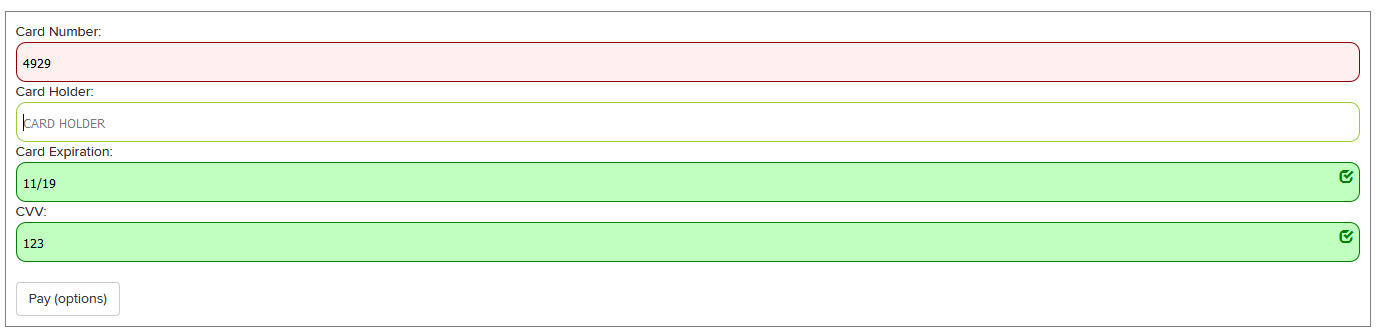
It should be remembered that during user interaction with the form, tags`div`classes can be assigned`mandarinpay-field-state-error`,`mandarinpay-field-state-focused`And`mandarinpay-field-state-valid`, indicating, respectively, the state of each field and the values entered into it (the hosted fields script also validates the values as they are entered).
Accordingly, now we need to add styles that allow us to display the form more clearly and allow the user to intuitively understand what exactly is happening with the form at the moment.
**CSS for fields**
```css
.hosted-field
{
background: #f0f0f0;
height: 40px;
padding: 5px;
border: 1px solid gray;
border-radius: 10px;
}
.hosted-field {
position: relative;
}
.hosted-field .glyphicon {
visibility: hidden;
position: absolute;
right: 5px;
top: 5px;
color: green;
float: right;
}
.mandarinpay-field-state-error
{
background: #fff0f0;
border: 1px solid #900000;
}
.mandarinpay-field-state-focused
{
background: #ffffff;
border: 1px solid yellowgreen;
}
.mandarinpay-field-state-valid {
background: #c0ffc0 !important;
border: 1px solid green !important;
}
.mandarinpay-field-state-valid .glyphicon{
visibility: visible;
}
But this way you can only customize those elements that exist on the page; everything displayed directly iniframe, not available for styles. Styling Contentiframecarried out by adding the corresponding field to the object passedmandarinpay.hosted.setup. Placeholder and CSS styles are available for modification.
Example of styling for payment
mandarinpay.hosted.setup("#form-hosted-pay",
{
  operationId: "9874694yr87y73e7ey39ed80",
  fields:
  {
    "card-number": {
      settings: {
        placeholder: "НОМЕР КАРТЫ",
        styles: {
          "font-size": "20px",
          "font-family": "Helvetica",
          "color": "#0000c0"
        },
        placeholderStyles: {
          "color": "pink"
        },
      }
    },
    "card-cvv": {
      settings: {
        placeholder: "123",
        styles: {
          "font-size": "20px",
          "font-family": "Helvetica",
          "color": "#555"
        },
      }
    },
  }
});
Payout styling example
mandarinpay.hosted.setup("#form-hosted-pay",
{
  operationId: "9874694yr87y73e7ey39ed80",
  fields:
  {
    "card-number": {
      settings: {
        placeholder: "НОМЕР КАРТЫ",
        styles: {
          "font-size": "20px",
          "font-family": "Helvetica",
          "color": "#0000c0"
        },
        placeholderStyles: {
          "color": "pink"
        },
      }
    }
  }
});
colorin format#000000. -font-sizewith unitspxAndpt. -font-family(you can use commas and quotes). -font-style.
As a result, we get a similar basic version of the appearance:
# Form events and their handling
To improve user interaction with the site and with the payment form, it is necessary to receive and process events that occur while the user is working with the form. To achieve this, several event handler hooks were implemented; a code example with explanations is given below.
Implementation of payment hooks
mandarinpay.hosted.setup("#form-hosted-pay",
{
  operationId: "9874694yr87y73e7ey39ed80",
  onsuccess: function(data) {
    // Событие, срабатывающее при успешной оплате.
    // Возвращаемые данные содержат информацию для дальнейшей обработки или демонстрации пользователю.
    alert("Success, id: " + data.transaction.id + ' card number: ' + data.cardInfo.maskedCardNumber);
  },
  onerror: function(data) {
    // Событие, срабатывающее при неудаче - например, нет денег на карте, неверный номер карты и так далее.
    alert("Error code: " + data.errorCode +" text: " + data.error);
  },
  oncancel: function(data) {
    // Событие, срабатывающее при отказе пользователя от оплаты - например, закрытие окна 3-D Secure вместо ввода кода.
    console.log(data);
  },
  onvalidationerror: function() {
    // Событие срабатывает при попытке отослать невалидные данные при нажатии на кнопку оплаты.
    alert("Validation error");
  },
  onformstatechange: function(state) {
    // Событие, отрабатывающее каждый раз на изменение состояния формы - например, ввод данных пользователем, потеря фокуса и так далее. Если, например, надо активировать кнопку оплаты только если все данные, введенные пользователем во все поля, валидны - удобно использовать это событие для проверки.
    console.log(state);
  },

  fields:
  {
    "card-number": {
      settings: {
        placeholder: "НОМЕР КАРТЫ",
        styles: {
          "font-size": "20px",
          "font-family": "Helvetica",
          "color": "#0000c0"
        },
        placeholderStyles: {
          "color": "pink"
        },
      }
    },
    "card-cvv": {
      settings: {
        placeholder: "123",
        styles: {
          "font-size": "20px",
          "font-family": "Helvetica",
          "color": "#555"
        },
      }
    },
  }
});
Implementation of payout hooks
mandarinpay.hosted.setup("#form-hosted-pay",
{
  operationId: "9874694yr87y73e7ey39ed80",
  onsuccess: function(data) {
    // Событие, срабатывающее при успешной оплате.
    // Возвращаемые данные содержат информацию для дальнейшей обработки или демонстрации пользователю.
    alert("Success, id: " + data.transaction.id + ' card number: ' + data.cardInfo.maskedCardNumber);
  },
  onerror: function(data) {
    // Событие, срабатывающее при неудаче - например, нет денег на карте, неверный номер карты и так далее.
    alert("Error code: " + data.errorCode +" text: " + data.error);
  },
  oncancel: function(data) {
    // Событие, срабатывающее при отказе пользователя от оплаты - например, закрытие окна 3-D Secure вместо ввода кода.
    console.log(data);
  },
  onvalidationerror: function() {
    // Событие срабатывает при попытке отослать невалидные данные при нажатии на кнопку оплаты.
    alert("Validation error");
  },
  onformstatechange: function(state) {
    // Событие, отрабатывающее каждый раз на изменение состояния формы - например, ввод данных пользователем, потеря фокуса и так далее. Если, например, надо активировать кнопку оплаты только если все данные, введенные пользователем во все поля, валидны - удобно использовать это событие для проверки.
    console.log(state);
  },

  fields:
  {
    "card-number": {
      settings: {
        placeholder: "НОМЕР КАРТЫ",
        styles: {
          "font-size": "20px",
          "font-family": "Helvetica",
          "color": "#0000c0"
        },
        placeholderStyles: {
          "color": "pink"
        },
      }
    }
  }
});
# Adding Apple Pay functionality
For devices that support Apple Pay, it's useful to add payment via Apple Pay. This functionality is also available to our script, but requires a slightly more complex connection. The Apple Pay button should not be shown if the browser or device does not support this functionality, or if the merchant does not allow payment via Apple Pay; There is a special check for this, which is described below.
Let's start by initializing the form. For the previously considered functionality this was not important to us, but in generalmandarinpay.hosted.setupthis is a promise that returns a session with additional functionality. A discussion of promises is beyond the scope of this instruction, so this example assumes that promises are always fulfilled and only shows the processing of successfully returned data.
Initialization of the script with access to additional functionality
// Важно обратить внимание на то, что область видимости переменной hostedSession должна быть глобальной - возможно обращаться к этой переменной из разных мест и даже скриптов.
var hostedSession;

mandarinpay.hosted.setup("#form-hosted-pay",
{
  operationId: "9874694yr87y73e7ey39ed80",
  onsuccess: function(data) {
  },
  onerror: function(data) {
  },
  oncancel: function(data) {
  },
  onformstatechange: function(state) {
  },
  fields:
  {
    "card-number": {
      settings: {
        placeholder: "НОМЕР КАРТЫ",
        styles: {
          "font-size": "20px",
          "font-family": "Helvetica",
          "color": "#0000c0"
        },
        placeholderStyles: {
          "color": "pink"
        },
      }
    },
    "card-cvv": {
      settings: {
        placeholder: "123",
        styles: {
          "font-size": "20px",
          "font-family": "Helvetica",
          "color": "#555"
        },
      }
    },
  }
}).then(function(result){
    // Получаем результат промиса - сессию - и сохраняем ее в нашей глобальной переменной hostedSession - дальше возможно или обращаться к сессии из других мест через переменную hostedSession (например, при нажатии на кнопку Apple Pay), или, например, передавать сессию напрямую в функцию.
    hostedSession = result;
    // Проверка на то, поддерживает ли устройство и мерчант эппл-пей возможно, разумеется, только после получения сессии, поэтому запускается по возвращению промиса.
    setupPromiseReturned(result);
  });

function setupPromiseReturned(result){
  // запускаем промис isApplePaySupportedAsync . Когда промис вернет ответ, передается ответ в функцию processApplePayResolve. Ответ, собственно, может быть только true или false.
  result.isApplePaySupportedAsync().then(processApplePayResolve);
}
function processApplePayResolve(result){
  // Скрипт прислал ответ, можно ли в данном случае показывать кнопку Apple Pay. Проверка включает в себя и поддержку браузера, и настройки мерчанта. Ответ может быть true или false
  if (result){
    console.log('Apple Pay поддерживается. Показываем кнопку.');
    $('.apple-pay-button').show();
  }else{
    console.log('Apple Pay не поддерживается. Не показываем кнопку.');
  }
}
We also add an Apple Pay button to the form. You can add it anywhere.
Form code with Apple Pay button
<form id="form-hosted-pay">
  <div style="margin: 10px; padding: 10px; border: 1px solid gray">
    Card Number:
    <div class="mandarinpay-field-card-number hosted-field"><div class="glyphicon glyphicon-check"></div></div>
    Card Holder:
    <div class="mandarinpay-field-card-holder hosted-field"><div class="glyphicon glyphicon-check"></div></div>
    Card Expiration:
    <div class="mandarinpay-field-card-expiration hosted-field"><div class="glyphicon glyphicon-check"></div></div>
    CVV:
    <div class="mandarinpay-field-card-cvv hosted-field"><div class="glyphicon glyphicon-check"></div></div>
    <br/>
    <a href="#" onclick="return mandarinpay.hosted.process(this);" class="btn btn-default">Оплатить</a>
    <div class="apple-pay-button apple-pay-button-black" style="display: none;" onclick="return hostedSession.popupApplePay('#form-hosted-pay');"></div>
  </div>
</form>
Please note that the button is hidden by default - it is not known whether Apple Pay is supported or not until promises are processed, and therefore we cannot immediately show the button. If the response from the isApple PaySupportedAsync promise is positive, the button is shown to the user, and if it is negative, it simply remains hidden.
Apple offers its own instructions on the shape, size, display rules and other operating features (opens new window) with the Apple Pay button; an example of one of the possible layout implementations is given below.
@supports (-webkit-appearance: -apple-pay-button) {
    .apple-pay-button {
        display: inline-block;
        -webkit-appearance: -apple-pay-button;
    }
    .apple-pay-button-black {
        -apple-pay-button-style: black;
    }
    .apple-pay-button-white {
        -apple-pay-button-style: white;
    }
    .apple-pay-button-white-with-line {
        -apple-pay-button-style: white-outline;
    }
}
Considering the capabilities provided by the hosted fields script, the possibilities of integrating a payment form into your interface are limited only by the imagination of your designer and the experience of the programmer. Some examples of hosted fields form integration can be seen on demo page (opens new window).
# Payment via SBP for Custom Form
Each request must be authenticated using a token (access_token), obtained in accordance with the OAuth 2.0 protocol for applications.
The token is valid for 36,000 seconds (10 hours). If the validity period has expired, the token must be requested again.
Contact Customer Service (opens new window) to find out yourclient_idAndclient_secretto getaccess_token.
Request to receive a token:
Includes mandatory form-data parameters that are passed in the request body (parametersapplication.client_id and application.client_secretare immutable for the application and stored on the client side).
| Parameter | Description | Example |
|---|---|---|
| grant_type | Authorization grant (always equal toclient_credentials). | client_credentials |
| client_id | Client ID (equal to the valueapplication.client_id, provided by Mandarin). | VvPtlhcyldKtkuoUWY42 pErdrj4er2AwFoBWrn8n |
| client_secret | Secret key-password of the client (equal to the valueapplication.client_secret, provided by Mandarin). | uQfOIMsltZYL8x3XMqUGP5 iFM59PyFnKlN0UmD3Ihre2 Ry3AGazUAv5jPdUI4dBJqV 0Of6b9GFvWvzGahYnq2aVV xkxn9n4qWF57FP0C01Kp6l EtajhfYv3UZ2f4pAZ7 |
| scope | Requested scopes (access areas). The delimiter is a space. You can request any list of scopes, and the response will return the list of requested scopes that can be provided for a given application. | secure:sbp_transaction.read secure:sbp_transaction.write |
curl --request POST \
  --url https://accounts.mandarin.io/oauth/token/ \
--form 'grant_type=client_credentials' \
--form 'client_id=VvPtlhcyldKtkuoUWY42pErdrj4er2AwFoBWrn8n' \
--form 'client_secret=uQfOIMsltZYL8x3XMqUGP5iFM59PyFnKlN0UmD3Ihre2Ry3AGazUAv5jPdUI4dBJqV0Of6b9GFvWvzGahYnq2aVVxkxn9n4qWF57FP0C01Kp6lEtajhfYv3UZ2f4pAZ7' \
--form 'scope=secure:sbp_transaction.read secure:sbp_transaction.write'
Answer:
| Parameter | Description | Example |
|---|---|---|
| access_token | Token (access key). | VnuxZiW14mXBedDeZO7d W7GBmzPxMn |
| expires_in | Token validity period (in seconds). Always equal to 36,000 seconds (10 hours). | 36000 |
| token_type | Token type (always equal toBearer). | Bearer |
| scope | Allowed scopes (access areas). | secure:sbp_transaction.read secure:sbp_transaction.write |
{
    "access_token": "VnuxZiW14mXBedDeZO7dW7GBmzPxMn",
    "expires_in": 36000,
    "token_type": "Bearer",
    "scope": "secure:sbp_transaction.read secure:sbp_transaction.write"
}
Token Usage:
Indicated in the headers of each request, in the Authorization field, after a reserved word Bearer.
Authorization:Bearer VnuxZiW14mXBedDeZO7dW7GBmzPxMn
# Request to create a payment transaction
Headers:
- Authorization:
Bearer <your_api_key>- Content-Type:application/json
| Parameter | Required | Parameter | Required | |
|---|---|---|---|---|
| payment | Yes | customValues[] | No | |
| payment.action | Yes | customValues[].name | No | |
| payment.orderId | Yes | customValues[].value | No | |
| payment.price | Yes | metadata | No | |
| payment.orderActualTill | No | urls | No | |
| customerInfo | Yes | urls.return | No | |
| customerInfo.email | Yes | urls.callback | No | |
| customerInfo.phone | No* | |||
| allowinteractive | No | |||
| interactive | No |
POST https://secure.mandarinpay.com/api/transactions
{
	"payment": {
		"action": "pay",
		"orderId": "your_unique_order_id",
		"price": "1000.00",
		"orderActualTill": "2020-02-20 12:34:56+00:00"
	},
	"customerInfo": {
		"email": "user@example.com",
		"phone": "+79001234567"
	},
	"customValues": [
		{"name": "first parameter to save and show", "value": "p1"},
		{"name": "second parameter to save and show", "value": "p2"}
	],
	"metadata": {
		"first_parameter_to_callback_and_not_to_show": "p1",
		"second_parameter_to_callback_and_not_to_show": "p2"
	},
	"urls": {
		"callback": "http://...",
		"return": "http://..."
	}
}
Response in case of successful transaction creation (200 OK):
{
	"id": "43913ddc000c4d3990fddbd3980c1725",
	"userWebLink": "https://secure.mandarinpay.com/Pay?transaction=0eb51e74-e704-4c36-b5cb-8f0227621518",
}
Response options:
userWebLink- not used for Custom Form -id- created transaction, this id must be used in the next request for SBP
Answer if the transaction is not created (400 Bad request):
{
	"error": "Invalid request"
}
# Request to generate qrCodeUrl
We use the transaction id from the previous request, and also indicate the Mid of your project in the header
curl --request POST \
  --url https://secure.mandarinpay.com/api/public/sbp/43913ddc000c4d3990fddbd3980c1725 \
--header 'Mid: 1234'
Response in case of successful transaction creation (200 OK):
{
   "qrImage":"iVBORw0KGgoAAAANSUhEUgAAASwAAAEsCAYAAAB5fY51AAAnlUlEQVR4Xu3d+7OvZ1.................=",
   "qrUrl": "https://qr.nspk.ru/AD1P0012E6EDIC7378VFR6H3HDFF98TIP?type=02&bank=100000000010&sum=10&cur=RUB&crc=AFF5",
    "state": "pendingconfirmation"
}
Response options:
qrImage- opens a QR code for scanning, we show it to the payer using Custom Form -qrUrl- payment page, QR alternative -state- payment status
# Request payment status for SBP
RULES FOR REQUESTING STATUS
- Interval: 5 seconds (minimum 2 seconds).
- Stop requesting status when receiving: success/failed
- Limit: 30 minutes (if the pending status is longer than 30 minutes, the operation is considered unsuccessful).
Description of statuses:
| Status | Description |
|---|---|
| success | The payment was successful, the funds were debited from the payer's account |
| failed | Payment was declined (see error details in transaction monitoring (opens new window)) |
| pending | Waiting for payment (the payer has not yet taken action to pay) |
curl --request GET \
  --url https://secure.mandarinpay.com/api/public/sbp/43913ddc000c4d3990fddbd3980c1725/status \
--header 'Mid: 1234'
Answer if successful:
{
    "status": "success"
}
Response if unsuccessful:
{
    "status": "failed"
}
Response if of waiting for payment:
{
    "status": "pending"
}
# Interactive payment as an example of Custom Form implementation
Interactive payment uses card token. Unlike the usual recurrent payment, in the case of interactive payment the user enters CVV/CVC code. To implement a CVV/CVC code entry form, you must use the Custom Form technology.
So you can use full card data token even if it is in [status](./api_tokenization.md#tokenization-full-card data)payout-onlyboth for payment in the [one-stage payment] scheme (./api_payments.md#one-step-payment), and for authorization in the [two-stage payment] scheme (./api_payments.md#authorization).
Interactive payment can be implemented in two ways:
interactive. Payment will be made interactively regardless of the token status. To do this you need to transfer"interactive": true.allowinteractive. Payment will be made using auto debit (recurring payment). If the token is in statuspayout-only, then it will be carried out interactively. To do this you need to transfer"allowinteractive": true.
Payment occurs in two stages:
Initiation (interactively via API).
Creating a transaction (using Custom Form).
# Initiation
As an example, consider the request payment using a saved card in interactive mode, where"interactive": true.
To request payment using a saved card without entering a CVV/CVC code and without going through 3-D Secure, where"allowinteractive": true, you must use the same parameters.
The synchronous response contains idpayment, andjsOperationIdto create a transaction via Custom Form.
Interactive payment request for one-step payment
POST https://secure.mandarinpay.com/api/transactions
{
	"payment": {
		"action": "pay",
		"orderId": "your_unique_order_id",
		"price": "1000.00"
	},
	"target": {
		"card": "0eb51e74-e704-4c36-b5cb-8f0227621518"
	},
	"interactive": true,
	"customValues": [
		{"name": "first parameter to save and show", "value": "p1"},
		{"name": "second parameter to save and show", "value": "p2"}
	],
	"metadata": {
		"parameter to callback and not to show 0": "0",
		"parameter to callback and not to show 1": "1"
	},
	"urls": {
		"callback": "http://...",
		"return": "http://..."
	}
}
Request interactive authorization for two-step payment
POST https://secure.mandarinpay.com/api/transactions
{
	"payment": {
		"action": "preauth",
		"orderId": "your_unique_order_id",
		"price": "1000.00"
	},
	"target": {
		"card": "0eb51e74-e704-4c36-b5cb-8f0227621518"
	},
	"interactive": true,
	"customValues": [
		{"name": "first parameter to save and show", "value": "p1"},
		{"name": "second parameter to save and show", "value": "p2"}
	],
	"metadata": {
		"parameter to callback and not to show 0": "0",
		"parameter to callback and not to show 1": "1"
	},
	"urls": {
		"callback": "http://...",
		"return": "http://..."
	}
}
Response in case of successful initiation (200 OK)
{
	"id": "43913ddc000c4d3990fddbd3980c1725",
	"jsOperationId": "9874694yr87y73e7ey39ed80"
}
Response if initiation does not occur (400 Bad request)
{
	"error": "Invalid request"
}
# Creating a transaction
Received in synchronous responsejsOperationIdwithin the framework of previous request must be used to create a transaction via Custom Form.
In this case, you only need to pass the valueCVV. Transfer of other card data is not required.
A detailed description is in the relevant section.
Creating a transaction via Custom Form
The HTML form matches the one used for the full payment form, just removing all fields except the CVV field:
<form id="form-hosted-pay">
  <div style="margin: 10px; padding: 10px; border: 1px solid gray">
    CVV:
    <div class="mandarinpay-field-card-cvv hosted-field"><div class="glyphicon glyphicon-check"></div></div>
    <br/>
    <a href="#" onclick="return mandarinpay.hosted.process(this);" class="btn btn-default">Оплатить</a>
  </div>
</form>
The form is initialized in exactly the same way as the standard payment form is initialized. The same events, hooks, styling, etc. are supported as in the standard form. Example:
<script>
mandarinpay.hosted.setup("#form-hosted-pay", {
  operationId: "9874694yr87y73e7ey39ed80",
  onsuccess: function(data) {
    alert("Success, id: " + data.transaction.id);
  },
  onerror: function(data) {
    alert("Error: " + data.error);
  }
});
</script>